Easily check your LESCO electricity bill online & download a duplicate copy for payment or record-keeping. Whether you need to view your latest charges, track units consumed, or apply for a new connection, this guide provides all the information in one place. Using BillCheckPK, you can access your LESCO eBill quickly, safely, and for free—anytime, from any device.
Search Your LESCO Electricity Bill
* 14-digit Reference Number is printed on your previous LESCO bill.
Table of contant
How to Check LESCO Bill Online
Just enter your “14 digit reference number” or “7 digit customer id” in the given space & press Enter. Your bill will be generated. By following this process,
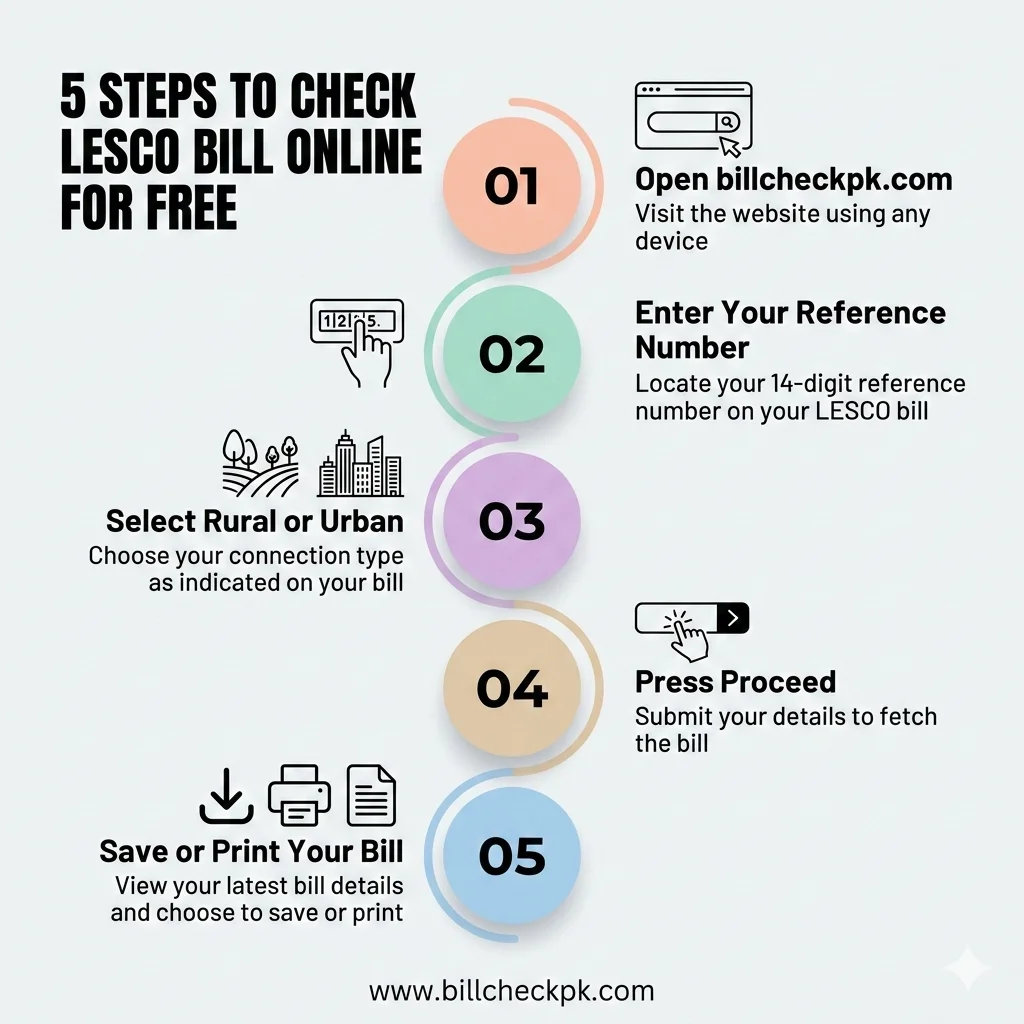
How to Check LESCO Bill by Reference Number & Customer ID
You can view your electricity bill by entering your 14-digit reference number or your 7-digit customer ID. Once submitted, the system will display your bill with details such as units consumed, total charges, taxes, and due date.
Steps to Check Your Bill:
- Open BillCheckPK LESCO page.
- Enter your 14-digit reference number or 7-digit customer ID.
- Click Check Bill.
- Your latest bill will load instantly. You can download or save it as a PDF, or print it for future reference.
Always use the latest reference number printed on your bill to ensure accurate results.
If a customer residing in Kasur wants to check their electricity bill online, they can do so on our site. If you experience unscheduled load shedding, you can contact the emergency helpline for more information. Open our page WAPDA Emergency Helpline.
How to Download and Print LESCO Duplicate Bill in PDF
Would you like to download the bill as a PDF file? Now you can easily download your bill as a PDF by following these steps.
1. Open www.billcheckpk.com/lesco-bill-online-check/
2. Enter your Reference Number in the given space
3. Press “Check LESCO Bill.”
4. Your bill will be loaded on a new page
5. Press “Print” and then select “Save as PDF” from Destination
6. Now press ”Save” and select destination folder & save
The duplicate PDF bill is valid for payment everywhere.
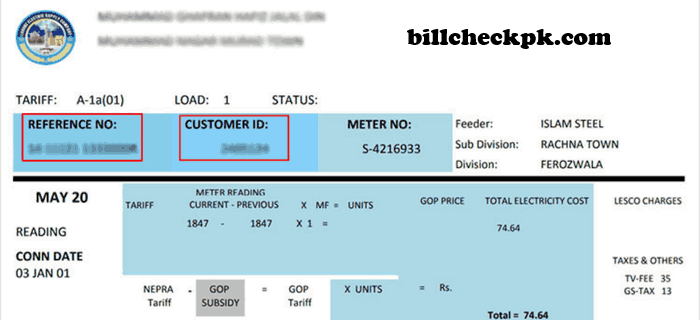
How to Find the Reference Number and Customer ID
Old Bills
You can find your Reference Number or Customer ID on your previous bills, usually printed at the top left corner. Don’t have your old bills or need the information while on the go? No worries – we’ve got you covered with a simple solution.
Online Portal
If you don’t have an old bill, visit the official online portal and select the “View Bill” option. Enter the required details, such as your name, ID card number, and address, to access your bill information. From there, you can easily note your Reference Number and Customer ID. All bill updates are available on the government’s official website.
Customer Services Centre
If you’re still unable to find your Reference Number or Customer ID, visit your nearest customer service centre with your ID card. Provide your ID (and a copy) to the staff, and they will help you retrieve yourreference number and customer ID. These details are always required to access your online bill and make payments.
Introduction of LESCO (Lahore Electric Supply Company)
LESCO (Lahore Electric Supply Company) is one of the largest power supply companies in Pakistan. It provides electricity to the districts of Lahore, Sheikhupura,Okara,Kasur & Nankana Sahib, serving both urban and rural areas. Operating under the Water and Power Development Authority (WAPDA), LESCO follows its motto: “The Lifeline for Progress.”
Serving over 5 million customers, LESCO emerged from the restructuring of WAPDA & now covers a vast area of approximately 30,000 square kilometres, including commercial, residential, agricultural, & industrial zones such as Shahpur, Bata, and various processing units.
LESCO is dedicated to ensuring a reliable and uninterrupted electricity supply to all its consumers. To maintain and improve service standards, the company regularly upgrades its distribution network using the latest technologies. If you face any issues or are unsatisfied with the services, you can file a complaint online through the Complaint Management System.
Areas Covered by LESCO
The five districts fall under the jurisdiction of Lahore Electric Supply Company (LESCO). The company serves both rural and urban areas across these regions, ensuring electricity distribution without distinction between metropolitan and countryside locations.
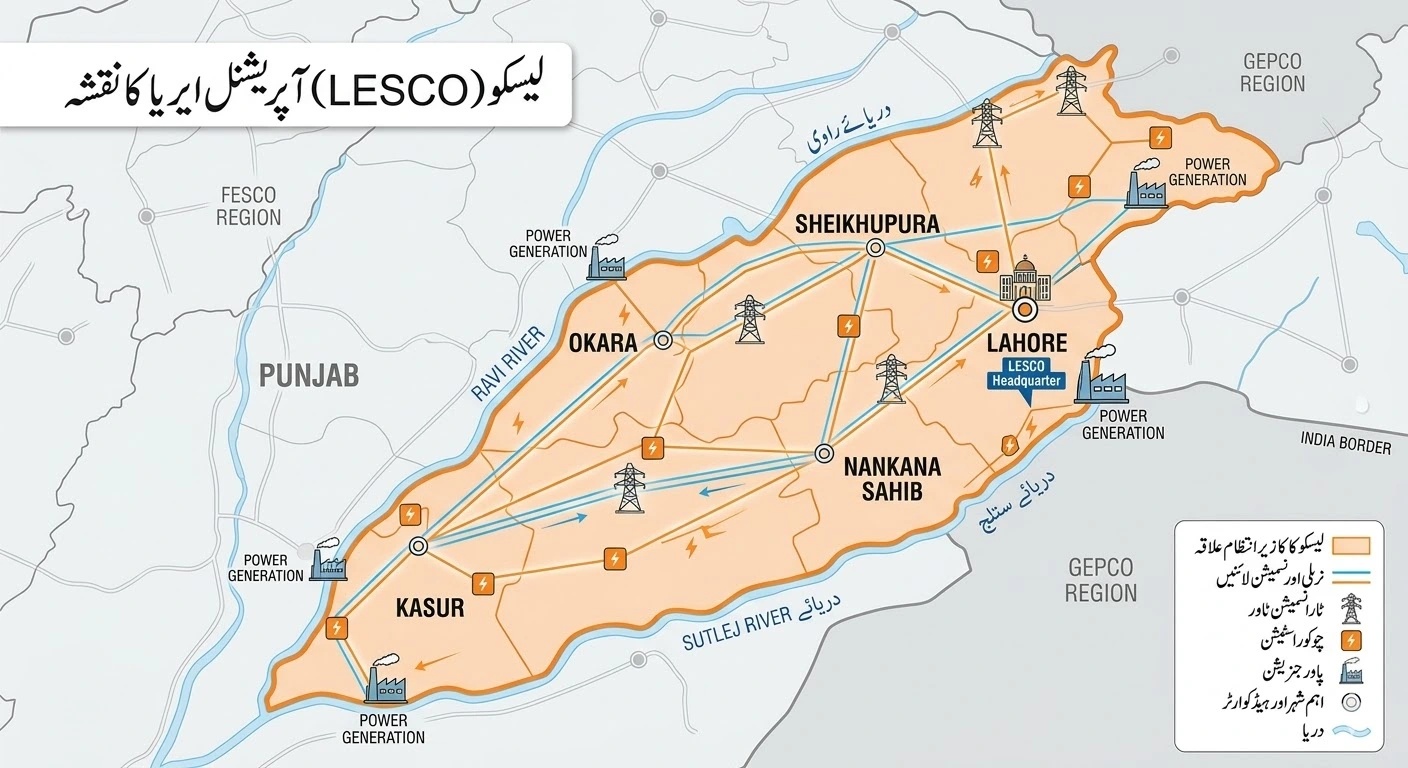
Operation Circles of LESCO
LESCO divides its electricity supply area into circles, each with multiple divisions and subdivisions, to ensure smooth services. Residents of Lahore and nearby cities can use the free LESCO online bill check to view their electricity bills easily.
Details of the operation circles are given below:
| Circle No | Circle Name | Divisions | Sub Divisions |
| 1 | North Lahore Circle | 5 | 28 |
| 2 | Central Lahore Circle | 5 | 31 |
| 3 | Eastern Lahore Circle | 4 | 23 |
| 4 | South-Eastern Lahore | 4 | 26 |
| 5 | Okara Circle | 4 | 23 |
| 6 | Sheikhopura Circle | 4 | 18 |
| 7 | Kasur Circle | 5 | 30 |
| 8 | Nankana Circle | 4 | 16 |
Check Shutdown Schedule by enter Reference Number
As we all know, we are facing a shortage of electricity, and this issue is becoming increasingly severe over time. Our electricity demand is increasing at a higher rate than the supply of electricity. This results in a shortage of electricity, which is typically addressed through load management, commonly referred to as load shedding.
Enter your Reference Number to view the shutdown schedule:
How to Download & Print your Lesco Bills Online
When you get your online lesco bill by entering your reference number in the given space, you can easily print your online duplicate bill. For this, just press the button “print bill” on the duplicate bill window. You can also use the shortcut key of Ctrl + P to print the bill directly. However, if you don’t have a printer at your disposal, don’t worry – the bill will be saved and downloaded to your download folder.
Bill by your CNIC
You can also get your duplicate bill online by your CNIC number. For this, you can use the web portal. Enter your CNIC in the web portal to obtain your consumer number. After obtaining your consumer number, you can follow the procedure above to get your online duplicate bill.
You can now apply online for a new electricity connection. For information and to apply online, please visit our New Connection page.
Bill Payments
LESCO provides multiple ways for customers to pay their bills, including LESCO online bill payment. Users can choose the method that suits them best, and LESCO bill tracking allows verification of payments and ensures bills are up to date.
With Banks
All commercial and registered banks, as well as their branches, can collect bill payments. Customers can visit and pay bills at their nearest bank branches. Customers can pay bills by using cash, cheques, and bank drafts.
By Easypaisa
Customers can conveniently pay their LESCO bills via the EasyPaisa app or manually by dialing *786# and following the simple steps.
By Jazz Cash
LESCO also allows bill payment through the JazzCash mobile app. Simply log in, enter your reference number, view your bill details, and tap “Pay Now” to complete the payment.
Post Offices
Now, customers can pay their bills at all post offices across Pakistan. At post offices, customers can pay their bills using cash, cheques, bank drafts, and debit or credit cards.
Via ATM
LESCO is adopting new technologies to make bill payment easier. Customers can now pay their bills using ATMs by inserting their card and selecting the “Pay Bill” option to complete the process.
Service Centres
LESCO has opened service centres where customers can pay bills using cash, cheque, bank draft, or debit/credit card. Customers can also track their meter readings and units consumed before the bill arrives by registering for the SMS service, with the meter reading date available on their bill.
Extension of Due Date and Bill Instalments
If a customer cannot pay their bill by the due date, they can apply for an extension or request bill instalments. The instalment facility can be used once a year, and the process must be followed on the bill’s due date. Specific competent officers handle extensions and instalment requests based on the bill amount.
| Competent Officer | Maximum 10 days for all amounts | Installments of Bills |
| SDO/AM(O) RO/AM(CS) | Maximum 03 days for bills up to Rs. 50,000/- | 03 monthly instalments for amounts of bills up to Rs. 200,000/- |
| XEN/DM(O) | Maximum 03 days for bills up to Rs. 200,000/- | 04 monthly instalments for amounts of bills up to Rs. 500,000/- |
| SE/Manager (O) | Maximum 05 days for bills up to Rs. 500,000/- | 05 monthly instalments for the number of bills up to Rs. 1000,000/- |
| Director Commercial | Maximum 05 days for bills up to Rs. 1000,000/- | 12 monthly instalments for amounts of bills up to Rs. 20 Million |
| CSD | Maximum 08 days for bills up to Rs. 20 Million | 03 monthly instalments for the amount of bill up to Rs. 50,000/- |
| CEO | 03 monthly instalments for the amount of the bill up to Rs. 50,000/- | 03 monthly instalments for the amount of bills up to Rs. 50,000/- |
LESCO Tariff
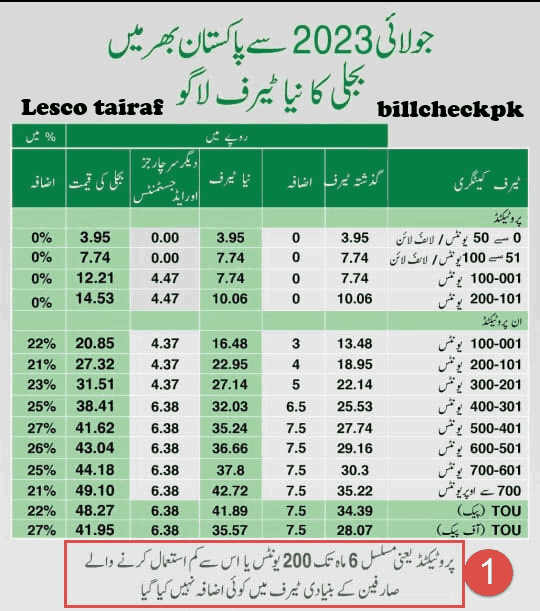
Electricity comes with a cost called a tariff, which varies based on consumption. LESCO uses a slab system, charging higher rates for higher usage while keeping rates lower for low-income consumers to provide relief and cover operational costs.
For this purpose, it divides its consumers into two groups, namely protected consumers and unprotected consumers. If you want to study in detail about Electricity Tariffs, then visit the Tariff Rate. There are some taxes in the bill that are referred to as miscellaneous (misc).
LESCO Tariff Prime Minister Announces Reduction in Electricity Prices
The Prime Minister of Pakistan announced a reduction in electricity prices to provide relief to consumers. Following negotiations with the IMF and IPPs, residential users received a Rs 7.41 per unit reduction. Price reductions vary for different consumer segments.
| Consumer Type | Old Price | New Price | Price Cut | %age Reduction |
|---|---|---|---|---|
| Lifeline ( Up to 100 Units ) | Rs 14.66 | Rs 8.52 | Rs 6.14 | 32% |
| Protected ( Up to 200 Units ) | Rs 17.65 | Rs 11.51 | Rs 6.14 | 35% |
| Non-Protected ( Up to 300 Units ) | Rs 41.14 | Rs 34.00 | Rs 7.14 | 17% |
| Over 300 Units | Rs 55.70 | Rs 48.46 | Rs 7.24 | 13% |
Protected Users
Consumers who use up to 200 units monthly for 6 months continuously are called protected consumers. For this category, the tariff is very low and is not affected by price hikes in electricity prices. They enjoy the privilege of being protected consumers. They did not bear even fuel price adjustments on a quarterly basis.
Un-Protected Users
Users who use more than 200 units monthly fall under the unprotected users category. They bear higher prices and unit rates. Unit rates increase with the increase in the number of units consumed.
They also bear fuel price adjustments every quarter. They also pay other taxes in addition to electricity prices. If you want to install a solar system and want knowledge about Net Metering or Green Meters, just visit our page of Net Metering.
Electricity Bill Slabs
It has introduced the slab system to protect its low-income users with low electricity usage. When a user consumes a lower number of units, they pay a lower electricity price, but when usage increases, the electricity rates also increase. When a consumer shifts to a higher slab, their bill increases significantly.
Slabs For Protected Users
| Slabs | Units | Rate |
| 1 | 0-50 ( Life Line Users ) | 3.95 |
| 2 | 51-100 ( Life Line Users ) | 7.74 |
| 3 | 1-100 | 12.21 |
| 4 | 101-200 | 14.53 |
Slabs For Non-Protected Users
| Slabs | Off-peak hours | Rate |
| 1 | 1-100 | 20.85 |
| 2 | 101-200 | 27.32 |
| 3 | 201-300 | 31.51 |
| 4 | 301-400 | 38.41 |
| 5 | 401-500 | 41.62 |
| 6 | 501-600 | 43.04 |
| 7 | 601-700 | 44.18 |
| 8 | 701- Onward | 49.10 |
| Peak hours | 48.27 | |
| Off Peak hours | 41.95 |
Peak/Off-Peak Hours
When electricity consumption is high, it is referred to as peak hours. It is a time when most users use electricity. It increases the burden on the national grid, resulting in higher prices. These hours change with the weather changes. Here is a table representing the peak hours for different seasons of the year:
| Season | Peak Timing | Off-Peak Timing |
| Dec-Feb | 5 pm – 9 pm | Remaining 20 hours |
| March-May | 6 pm – 10 pm | —- do —— |
| Jun-Aug | 7 pm – 11 pm | —- do —— |
| Sep-Nov | 6 pm – 10 pm | —- do —— |
Bills History/ Previous Bills
LESCO allows customers to view their previous bills for the past year. Duplicate bills are displayed on the right side, showing bill status to indicate if payment has been made. Consumers can also check their consumption and payment history online by visiting the official site, entering their reference number, and selecting “Consumption and Payment History.”
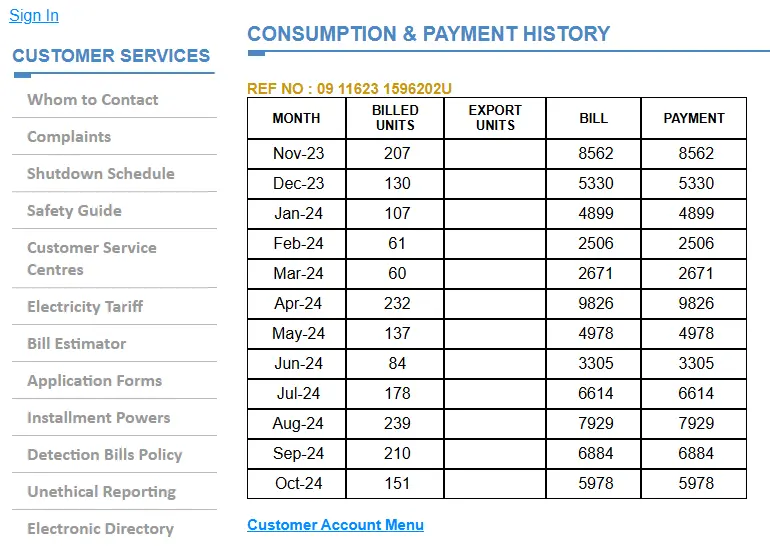
This will provide a preview of your billing history and the total amount paid in a month. This will also help you keep track of your monthly consumption and bill payments. In this way, you can compare your energy consumption and your expenses on utility bills as well.
Tips for Lower Your LESCO Bill
Are you worried about your high bill? Don’t worry, we are here to help you efficiently reduce your bill. Here, we provide you with some useful suggestions. If you follow these instructions, your bill will be significantly decreased
These were some suggestions to decrease your bill, but there will always be other possible ways to do so. Continue to explore new ways and technologies that can help you.
Quick Links (Other DISCOs at BillCheckPK)
LESCO FAQ Questions & Answers
- How to check LESCO bill online?
Visit BillCheckPK or the official LESCO website. Enter your 14-digit reference number or consumer ID to view your latest bill instantly. - How to download LESCO duplicate bill?
On BillCheckPK or LESCO portal, select “Duplicate Bill”, enter your reference number, and download the PDF copy for printing or record keeping. - How to pay LESCO electricity bill online?
Use Easypaisa, JazzCash, online banking, or mobile banking apps. Enter your reference number, confirm bill details, and complete the payment securely. - How to find LESCO bill by reference number?
Check any previous bill for the 14-digit reference number, or contact LESCO customer service with your consumer name, address, or meter number. - How to get LESCO new connection?
Apply online through the LESCO website or visit your nearest LESCO office. Submit required documents like ID, proof of ownership, and address. - How to contact LESCO customer service?
Call the LESCO helpline 118, or visit their official website for city-specific phone numbers and email contacts. - How to register a complaint with LESCO?
Submit complaints via phone (118), SMS (8118), email (ccm@pitc.com.pk), or through the LESCO CCMS online portal. Complaints are tracked until resolved. - How to check LESCO meter reading online?
Register for e-billing on BillCheckPK or LESCO website to receive your monthly meter reading and bill updates via SMS or email. - What is LESCO electricity tariff 2026?
LESCO follows NEPRA-approved rates. Domestic, commercial, and industrial consumers are charged differently based on units consumed and connection type. - How to print LESCO tax certificate online?
Visit LESCO portal or BillCheckPK, enter your reference number, select the tax year, and download/print your tax certificate in PDF format.