Check hesco electricity bill online at billcheckpk. Instantly view, download, or print your hesco duplicate bill and stay updated with tariffs.
Search Your HESCO Electricity Bill
Your bill is ready.
Click View Bill — paste this number on the next page.
* 14-digit Reference Number is printed on your previous HESCO bill.
HESCO Online Bill Check
View your HESCO electricity bill online through BillCheckPK. Enter your reference number for instant access and download Hesco duplicate bill. For personal calculations and fun insights, visit themelad.me for Hijri/Gregorian age tools, birthday countdowns, life statistics, and AI personality analysis.
🔗 Themelad: https://themelad.me
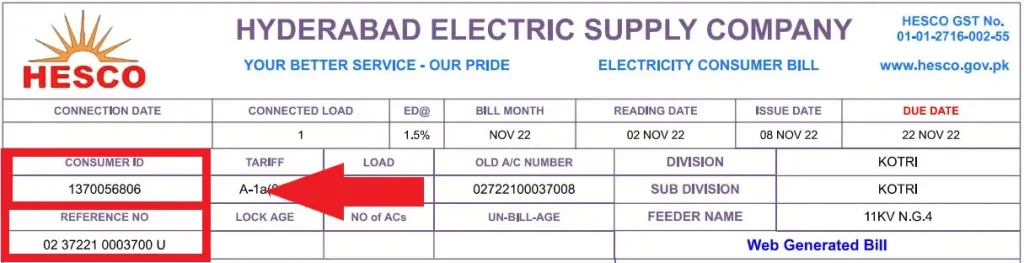
To download hesco duplicate bill, you just need to know your 14 digit reference number. If you don’t know where to find it, please see the red highlighted area in the picture below:
Table of Contents
Table of Contents
HESCO Introduction & History
Hyderabad Electric Supply Company (HESCO) was established in 1998 after the unbundling of WAPDA’s Power Wing. With headquarters in Hyderabad, Sindh, HESCO is responsible for electricity distribution in Hyderabad and surrounding districts of Sindh (excluding Karachi). Millions of consumers receive monthly electricity bills from HESCO, which can now be checked online anytime.
With the online system, you no longer need to worry about lost bills or late delivery.

Today, HESCO provides electricity to millions of domestic, agricultural, industrial, and commercial consumers, ensuring power supply, efficient complaint handling, and consumer facilitation through both physical offices and digital services like online bill checking and payments.
How to Check Your HESCO Bill Online – Step by Step
Checking your HESCO (Hyderabad Electric Supply Company) electricity bill online is quick and easy. Follow these steps:
Step 1: Visit the HESCO Bill Website
- Open your browser and go to billcheckpk.
- The website is responsive and works on all devices – desktop, tablet, or mobile.
Step 2: Enter Your 14-Digit Reference Number
- Locate your 14-digit reference number on any old HESCO bill.
- Enter this number in the designated field on the website.
Note: You cannot check your bill using your CNIC or name. The reference number is mandatory.
Step 3: View Your Bill
- After entering the reference number, your latest bill amount and due date will appear.
Step 4: View Full Bill or Download
- Click “View Full Bill” to see all bill details, including meter readings, surcharges, and adjustments.
- You can also download a PDF copy for your records or print it.
HESCO Service Area
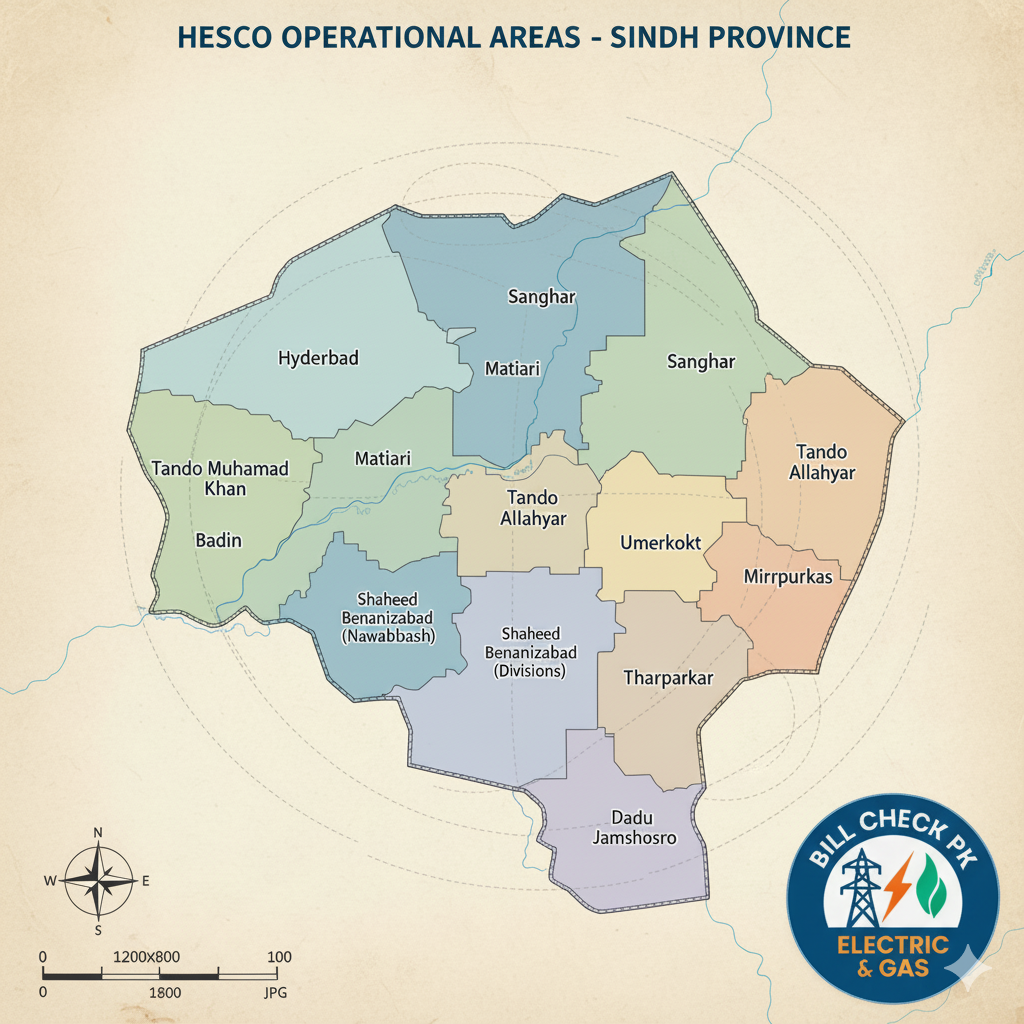
The Hyderabad Electric Supply Company (HESCO) provides electricity to a wide area covering 13 districts of Sindh (excluding Karachi). If you live in any of these districts, you can easily check and download your HESCO duplicate bill online via Billcheckpk.
Operational Structure:
- Circles: HESCO divides the operational area into 4 Circles, each managed by a Superintending Engineer (SE).
- Divisions: The company has 17 operational Divisions, each led by an Executive Engineer (EE).
- Sub-Divisions: There are 72 operational Sub-Divisions, which are the front-line units for customer services.
- Special Divisions: HESCO also maintains 6 Construction Divisions and 5 Maintenance & Testing (M&T) Divisions.
Districts Covered by HESCO
- Hyderabad – Major city and administrative hub.
- Jamshoro – Industrial and educational area.
- Thatta – Coastal district with agricultural activity.
- Badin – Includes rural and urban electricity consumers.
- Matiari – Growing residential and commercial connections.
- Tando Allahyar – Primarily agricultural consumers.
- Tando Muhammad Khan – Mix of domestic and commercial users.
- Sujawal – New districts with expanding electricity network.
- Dadu – Covers urban and rural feeders.
- Mirpurkhas – Agricultural and urban electricity consumers.
- Tharparkar – Desert district with seasonal consumption patterns.
- Umerkot – Rural and urban electricity supply.
- Sanghar – Diverse consumers including domestic, commercial, and agricultural.
Responsibilities:
- Ensuring uninterrupted electricity supply to over 1.2 million consumers.
- Issuing and managing electricity bills.
- Providing new connections and related services.
- Addressing customer complaints and service issues.
- Preventing electricity theft and maintaining infrastructure.
Customer Services:
- Online bill checking and duplicate bill download.
- Complaint registration and tracking.
- Application for new connections or upgrades.
Why This Information Matters
- Knowing your district helps you identify your regional HESCO office and helpline.
- Users can check their duplicate bills online by entering the 14-digit reference number.
- Helps consumers understand which areas are under HESCO jurisdiction, including for new connections, complaints, and load-shedding updates.
HESCO Operational Structure
| Circle | Number of Divisions | Number of Sub-Divisions |
|---|---|---|
| Hyderabad | 5 | 18 |
| Laar | 5 | 19 |
| Shaheed Benazirabad (Nawabshah) | 3 | 21 |
| Mirpurkhas | 3 | 13 |
| Total | 16 | 71 |
If you live in any of these districts, you can instantly check your HESCO duplicate bill on Billcheckpk.
HESCO Tariff 2026– Domestic, Commercial, Industrial & Agricultural
The NEPRA updated tariff for HESCO consumers is applied slab-wise for domestic, commercial, industrial, and agricultural connections. Billcheckpk provides a HESCO Bill Calculator so users can easily calculate estimated charges including FPA, TV Fee, GST, QTR tariff adjustments.
The Hyderabad Electric Supply Company (HESCO) Tariff is structured to cover all consumer categories, including domestic, commercial, industrial, and agricultural connections. NEPRA has updated the tariff rates for 2026, which are applied slab-wise, meaning the rate depends on how much electricity a consumer uses per month.
Domestic Tariff 2026
HESCO charges domestic consumers based on consumption slabs. Each slab has a fixed per-unit rate (Rs/kWh). Below is a simplified example (for illustration; always verify with official NEPRA notification):
| Units Consumed (kWh) | Rate per Unit (Rs) | Monthly Fixed Charges (Rs) |
|---|---|---|
| 0 – 50 | 5.50 | 30 |
| 51 – 100 | 7.50 | 30 |
| 101 – 200 | 10.00 | 30 |
| 201 – 300 | 12.50 | 30 |
| 301+ | 15.00 | 30 |
Note: Rates include applicable taxes like GST, TV Fee, and QTR adjustments.
Commercial Tariff 2026
Commercial connections (shops, offices, small businesses) have higher per-unit charges due to demand patterns and load factors
| Units Consumed (kWh) | Rate per Unit (Rs) | Fixed Charges (Rs) |
|---|---|---|
| 0 – 100 | 12.50 | 100 |
| 101 – 300 | 15.00 | 100 |
| 301 – 500 | 18.00 | 100 |
| 501+ | 20.00 | 100 |
Tip: Commercial consumers can reduce cost by tracking usage during peak vs off-peak hours.
Industrial Tariff 2026
Industrial connections include factories, mills, and production facilities. Rates depend on load type and consumption slabs. Industries are encouraged to monitor power factor to avoid penalties.
| Load Category | Rate per Unit (Rs) | Monthly Fixed Charges (Rs) |
|---|---|---|
| Low Voltage (LV) | 16.00 | 200 |
| High Voltage (HV) | 14.50 | 500 |
Agricultural Tariff 2026
Agricultural connections (tube wells, irrigation pumps) benefit from subsidized rates to support farmers.
| Units Consumed (kWh) | Rate per Unit (Rs) | Fixed Charges (Rs) |
|---|---|---|
| 0 – 200 | 3.50 | 50 |
| 201 – 500 | 5.00 | 50 |
| 501+ | 6.50 | 50 |
How Billcheckpk Helps You Calculate HESCO Bill
Calculate your HESCO bill instantly with our interactive online calculator. You don’t need your reference number to estimate electricity charges for domestic, commercial, industrial, or agricultural connections.
Features:
- Slab-wise rates included (Domestic, Commercial, Industrial, Agricultural).
- All taxes & charges included: FPA, TV Fee, GST, QTR adjustments.
- Compare current and previous months to track consumption.
- Mobile-friendly interface, free to use, no registration required.
How to Use:
- Select your connection type (Domestic, Commercial, Industrial, Agricultural).
- Enter units consumed (kWh).
- Optional: Enter 14-digit HESCO reference number for exact bill.
- Click “Calculate Bill” → View estimated charges.
Advanced HESCO Bill Calculator 2026
Benefits:
- Easy to use, free, no registration required.
- Helps manage household and business electricity budgets.
- Supports transparency by showing detailed slab-wise charges.
Key Features of HESCO Online Bill Service at Billcheckpk
- Check HESCO bill online using reference number
- Download or print duplicate HESCO bills anytime
- Track monthly electricity usage for comparison
- 100% free service, no registration required
- Pay bills via Easypaisa, JazzCash, or bank apps
CNIC & Mobile Number Registration for HESCO SMS Alerts
HESCO provides consumers with instant SMS alerts for monthly bills, load-shedding updates, and account notifications. To benefit from this service, you must register your CNIC and mobile number with HESCO.
Steps to Register CNIC & Mobile Number
- Visit the Official HESCO CNIC Registration Page
- Open the HESCO CNIC Registration Portal in your browser.
- Enter Required Details
- 14-Digit Reference Number: Found on your HESCO bill.
- CNIC Number: Your valid Computerized National Identity Card number.
- Mobile Number: The number on which you want to receive SMS alerts.
- Submit Your Information
- After entering all details correctly, click Submit.
- You will receive a confirmation SMS on your registered mobile number.
- Start Receiving Alerts
- Once registered, HESCO will send updates for:
- Monthly electricity bills
- Load-shedding schedules and outages
- Account notifications and payment reminders
- Once registered, HESCO will send updates for:
Registration
- Ensure your mobile number is active and correct.
- Keep your 14-digit reference number handy for faster registration.
- Registration is free and can be done online without visiting the office.
HESCO New Connection Guide 2026
If you want a new HESCO electricity connection, you need to follow the official process and provide certain documents. HESCO offers both online and offline application methods for your convenience.
Required Documents
To apply for a new connection, make sure you have:
- CNIC Copy – Valid Computerized National Identity Card.
- Ownership Proof – Property registry or allotment letter showing ownership or tenancy.
- Undertaking Form – Completed HESCO undertaking form (available online or at the office).
- Test Report from Licensed Electrician – Electrical installation certificate confirming safety compliance.
Steps to Apply for a New HESCO Connection
Online Application
- Visit the HESCO New Connection Portal.
- Select the “New Connection” option.
- Fill in your details: Name, CNIC, address, and connection type.
- Upload the required documents (CNIC, ownership proof, undertaking, test report).
- Submit the application.
- You will receive a confirmation SMS or email with your application reference number.
Offline Application
- Visit your nearest HESCO office.
- Request a New Connection Form from the customer service desk.
- Fill in the form and attach the required documents.
- Submit the form to the officer.
- You will be given a reference number and expected processing time.
After Submission
- HESCO will schedule a site inspection to verify the premises and installation.
- Upon approval, the new connection will be energized, and you will receive your first bill.
- Keep all documents ready before applying to avoid delays.
- Always use a licensed electrician for installation to pass the inspection.
- Track your application online using the reference number provided.
HESCO Helpline & Complaint System
HESCO provides consumers with a 24/7 complaint registration and support system to resolve electricity-related issues quickly and efficiently.
How to Register a Complaint
- Helpline (UAN)
- Call 118 from any phone to report electricity outages, billing issues, or other service problems.
- Regional Complaint Numbers
- Each HESCO district office has dedicated numbers for local complaints.
- Contact your district office for faster resolution of area-specific issues.
- Central Complaint & Response Cell (CRC) – Hyderabad
- The CRC monitors all feeders, handles major faults, and coordinates with field staff.
- You can call or email the CRC for unresolved or urgent issues.
Complaint Resolution Process
- Once a complaint is registered, HESCO staff monitors the issue and updates the status.
- Field teams are dispatched for fault rectification.
- Consumers may receive updates via SMS, call, or email depending on their registration.
Tips for Faster Resolution
- Always provide your 14-digit reference number when reporting a complaint.
- Clearly describe the problem and location.
- Keep a record of the complaint ID or reference number for follow-ups.
- For repeated outages, you can escalate the issue to the CRC in Hyderabad.
For general inquiries, you can also contact HESCO’s central helpline:
- General Helpline: 118
- Email: dmprhescohyd@gmail.com
HESCO Contact Directory – Sindh
Federal Complaint / Helpline
| Service | Mobile |
|---|---|
| HESCO Federal Complaint Cell | 03372192748, 03372192749, 03372192750 |
| 118-HESCO Helpline | 03372192751, 03372192752, 03372192753 |
Grid Stations – 132 KV
| Station | Phone | Mobile |
|---|---|---|
| Nooriabad | 025-4670210 | 03372192326 |
| T.M.Khan | 022-3342660 | 03372192338 |
| Badin | 0297-862275 | 03372192341 |
| Bulri Shah Karim | 022-3343181 | 03372192340 |
| Chambar | 022-3002601 | 03372192274 |
| Dour | 0244-325819 | 03372192261 |
| Ganghra Mori | 022-3037202 | 03372192306 |
| Golarchi | 022-3032075 | 03372192342 |
| Gulshan-e-Shahbaz | 022-2921116 | 03372192316 |
| Hala | 022-3332403, 022-3043529 | 03372192257 |
Grid Stations – 66 KV
| Station | Phone | Mobile |
|---|---|---|
| Chachro | 0232-273147 | 03372192286 |
| Digri | 0233-869410 | 03372192281 |
| Diplo | 0232-221296 | 03372192291 |
Key Officials & Departments
| Designation | Mobile |
|---|---|
| G.M (Tech.) | 03333700064 |
| Chief Commercial Officer | 03333700017 |
| Chief Engineer (Dev) | 03333700019 |
| Chief Engineer (Planning & Engineering) | 03333700021 |
| Chief Internal Audit | 03333700024 |
| Chief Operating Officer | 03333700012 |
| Addl. D.G (Finance) | 03408800202 |
| Addl. D.G (L&L) | 03333700029 |
Why Use Billcheckpk for HESCO Bills?
Billcheckpk is your one-stop solution for all HESCO-related services. Whether you want to check your bill, calculate charges, or register for SMS alerts, we provide accurate and updated information in a simple interface.
- Instant HESCO Duplicate Bill Check
- Check your current bill online using your 14-digit reference number.
- Download or print your duplicate bill anytime without visiting the office.
- Latest Tariff 2026 Updates
- Access the most recent NEPRA-approved tariff rates for domestic, commercial, industrial, and agricultural connections.
- Slab-wise rates are clearly presented for easy understanding.
- Bill Calculator with Taxes Included
- Use our HESCO Bill Calculator 2026 to estimate your monthly bill.
- All charges, including FPA, TV Fee, GST, and QTR adjustments, are automatically calculated.
- CNIC & Mobile Registration Guide
- Step-by-step instructions to register your CNIC and mobile number with HESCO.
- Receive SMS alerts for bills, load-shedding updates, and account notifications.
- HESCO Helpline, Office Addresses, and Complaint Details
- All contact information in one place for faster issue resolution.
- Find regional helpline numbers, CRC Hyderabad contacts, and office addresses easily.
Why Users Prefer Billcheckpk
- Free and easy-to-use – no registration required for bill checking.
- Accurate and updated – information sourced directly from HESCO and NEPRA.
- Mobile-friendly interface – check bills anytime, anywhere.
- Comprehensive support – from bill checking to complaints and new connection guidance.
HESCO Online Bill 2026
Last Updated
This page is regularly updated to reflect the latest HESCO tariffs, NEPRA notifications, and service information.
- Tariffs: Updated according to NEPRA 2026 official notifications.
- Bill Calculator & Charges: Reflects FPA, TV Fee, GST, QTR adjustments, and other applicable taxes.
- Helpline & Regional Offices: Verified as per HESCO official contacts.
Disclaimer
- Informational Purpose Only
- All data provided on this page, including tariff rates, bill estimates, and contact details, is sourced from HESCO and NEPRA official notifications.
- Billcheckpk is not responsible for actual billing discrepancies; always verify with your local HESCO office.
- Bill Estimates
- The HESCO Bill Calculator provides an estimated bill for reference only.
- Actual electricity bills may vary due to meter reading, load fluctuations, and applicable surcharges.
- Payments & Complaints
- For payment confirmations or complaints, contact HESCO through official helpline 118, regional offices, or the Central Complaint & Response Cell (CRC) Hyderabad.
- Copyright & Content Use
- All content on Billcheckpk is intended for informational purposes.
- Redistribution or commercial use of data without permission is prohibited.
HESCO Peak Hours
HESCO advises consumers to reduce electricity usage during peak hours. Doing so can help:
- Lower your electricity bill
- Stabilize the electricity supply across the entire service area
| Period | Peak Hours |
|---|---|
| April to October | 6:30 PM – 10:30 PM |
| November to March | 6:00 PM – 10:00 PM |
Quick Links (Other DISCOs at BillCheckPK)
- LESCO Bill Online Check
- FESCO Bill Online Check
- GEPCO Bill Online Check
- IESCO Bill Online Check
- MEPCO Bill Online Check
- HAZECO Bill Online Check
- PESCO Bill Online Check
- SEPCO Bill Online Check
- QESCO Bill Online Check
- TESCO Bill Online Check
- GAS Bill Online Check
- PTCL Bill Online Check
FAQs about HESCO
Q1: How can I check my HESCO bill online?
A1: You can check your HESCO bill online at billcheckpk by entering your 14-digit reference number. The system instantly shows your current bill details.
Q2: Can I download my duplicate HESCO bill without registration?
A2: Yes, you don’t need to create any account. Just enter your reference number on billcheckpk and download or print your duplicate HESCO bill anytime.
Q3: How to calculate HESCO bill including taxes?
A3: Use the HESCO Bill Calculator 2026 on billcheckpk. It adds GST, FPA, TV fee, and other charges automatically to show an estimated monthly bill.
Q4: What is the HESCO helpline number?
A4: For complaints and inquiries, call the HESCO helpline 118 or the toll-free number 0800-00118. You can also contact the regional complaint cell in Hyderabad.
Q5: Which districts are covered under HESCO?
A5: HESCO supplies electricity to 13 districts of Sindh including Hyderabad, Jamshoro, Badin, Thatta, Mirpurkhas, Sanghar, Tharparkar, Umerkot, and others.
Q6: Can I check my HESCO bill using CNIC or mobile number?
A6: No, HESCO bills can only be checked using the 14-digit reference number. CNIC and mobile numbers are used only for registration and SMS alerts.
Q7: How can I pay my HESCO bill online?
A7: HESCO bills can be paid online through Easypaisa, JazzCash, NayaPay, bank mobile apps, or ATMs without visiting the office.
Q8: What should I do if I lose my HESCO bill?
A8: Simply visit billcheckpk, enter your reference number, and download the duplicate HESCO bill instantly for payment.
Q9: How do I apply for a new HESCO connection?
A9: Consumers can apply for a new HESCO electricity connection online via the ENC system or by visiting their nearest HESCO customer service center.
Q10: Does HESCO provide load-shedding schedules online?
A10: Yes, HESCO updates feeder-wise load-shedding schedules on its website. Consumers can also confirm outages via helpline 118.
Q11: How can I register my CNIC and mobile number with HESCO?
A11: Visit the official HESCO registration page, enter your reference number, CNIC, and mobile number to start receiving SMS alerts and updates.
Q12: Can I track my previous HESCO bills online?
A12: Yes, on billcheckpk you can compare your current HESCO bill with previous months to track electricity usage and costs.
Billcheckpk is an informational portal. Billing data and tariff updates are sourced from official HESCO & NEPRA notifications . Always verify payments and charges with your nearest HESCO office.