Check GEPCO online bill easily. Get your duplicate electricity bill downloaded or printed from at Billcheckpk.
Search Your GEPCO Electricity Bill
Your bill is ready.
Click View Bill — paste this number on the next page.
* 14-digit Reference Number is printed on your previous GEPCO bill.
Quickly view your GEPCO electricity bill on BillCheckPK. Enter your reference number to download or print your bill.
Table of Contents
How to Check Your Bill by Reference Number
View your GEPCO bill online simple and convenient. Instead of waiting for a printed bill to arrive, you can check your latest unit charges, payment status & due date directly through Billcheckpk in just a few steps. The quick guide below explains how to access your bill instantly from any mobile device or computer
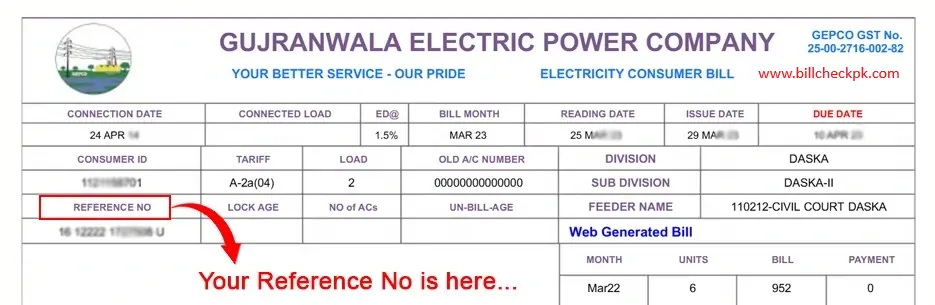
- Open Billcheckpk
Visit billcheckpk using any device, whether it’s a mobile phone, tablet, or computer. - Select GEPCO Online Bill
Navigate to the menu and click on the Online Bill Check option. - Add Your Bill Details
Enter your 14-digit reference number or customer ID taken from an earlier bill. - Submit the Request
Press the Check Bill button to proceed. - Access Your Bill
Your bill will load instantly on the screen. You can download the duplicate copy,save it or print it for payment and record purposes.
How to Check GEPCO Bill Without Reference Number
you need a 14-digit reference number to check your GEPCO electricity bill online. Without it, the bill cannot be directly searched in the online system. However, you can still find your bill details using a few alternatives.
Check a Previous Bill
Look at any old GEPCO bill to find the reference number, which is printed at the top.
Contact GEPCO Customer Service
You can contact the GEPCO helpline and provide details like consumer name, address, or meter number to get your reference number.
Visit the Nearest GEPCO Office
Go to a nearby GEPCO customer service center with your meter number or property details to retrieve your bill information.
Note: The GEPCO online system mainly works through the reference number, so it is best to save it for future bill checks.
Common Problems While Checking GEPCO Bill
Sometimes users face issues while checking their GEPCO bill online. Below are some common problems and simple solutions.
Invalid Reference Number
If you enter the wrong 14-digit reference number, the system cannot find your bill. Always check the number carefully before searching.
Bill Not Showing Online
Sometimes the new bill is not uploaded yet. In this case, wait for some time and try again later.
Website Not Loading.
If the website is slow or not opening, it may be due to heavy traffic or internet issues. Refresh the page or try again after a few minutes.
How to Pay Gepco Bill Online
Paying your GEPCO bill online is simple and convenient. GEPCO offers several ways for customers to pay their gepco electricity bills without visiting a bank. You can easily complete your payment through banking apps, mobile wallets or traditional bank branches.
Some common methods to pay your GEPCO bill include:
Mobile Wallets
Easypaisa & JazzCash allow you to pay your bill instantly. Just enter your reference number, confirm the details, & complete the payment. These services are available 24/7 with minimal charges.
Banking Apps
Banks in Pakistan also support bill payments through their internet banking mobile apps.Simply open your banking app, enter your GEPCO reference number, verify the bill, and confirm the payment from your account
The Gujranwala Electric Power Company is one of the major electricity distribution companies in Pakistan. GEPCO is responsible for the supply, distribution, and maintenance of electricity across Gujranwala and its surrounding districts.
With a large customer base covering millions of domestic, industrial,agricultural, & commercial consumers, GEPCO plays a vital role in ensuring uninterrupted power supply in the region. The company operates under the regulatory framework of NEPRA (National Electric Power Regulatory Authority).
GEPCO is committed to:
- Providing reliable and efficient electricity services.
- Offering online bill checking facilities for consumers.
- Supporting digital payments and duplicate bill downloads.
- Expanding coverage with improved infrastructure to meet growing demand.
By using BillCheckPK, consumers can instantly check, view, print, and download their electricity bills online.
GEPCO Bill – Detailed Overview
Reducing your electricity usage is one of the easiest ways to lower your bill. Some habits on daily basis can make a noticeable difference in your monthly bill.
Tips to Save Electricity and Lower Your GEPCO Bill
How to Get a New GEPCO Connection ?
If you want to apply for a new electricity connection, you can submit your application online through the official website of Gujranwala Electric Power Company.
Furthermore you can manually apply for a new connection by visiting your nearest GEPCO office and submit application there. For a detailed overview about how to apply GEPCO new connection you can visit the link .https://billcheckpk.com/gepco-new-connection/
GEPCO – Company Overview
Gujranwala Electric Power Company (GEPCO) is a power distribution company responsible for supplying electricity to several areas of Punjab under its jurisdiction. The company manages the distribution network and delivers electricity to commercial, industrial & residential consumers.
When Was GEPCO Founded?
GEPCO was incorporated on 25 April 1998 and started its business operations on 5 June 1998. The company operates under the supervision of a board of directors responsible for its management and administration. Before its establishment, electricity distribution in these regions was managed by government departments during the 1960s.
GEPCO Capacity
GEPCO’s capacity refers to its ability to distribute electricity safely and reliably to its consumers. Over the years, the company has expanded its distribution network. By May 2021, GEPCO was serving around 3.9 million electricity consumers.
Nature of Business
GEPCO is a public limited company that focuses on electricity distribution. Its main responsibility is to ensure a stable supply of power across the areas that fall under its service region.
Vision and Mission
The vision of GEPCO is to provide reliable electricity services while improving the overall experience for consumers. The company aims to make electricity services efficient, transparent, and accessible, while ensuring a safe and consumer-friendly environment for all users.
Areas Coverage of GEPCO
The Gujranwala Electric Power Company distributes electricity to a wide region of Punjab. GEPCO’s service area covers six major districts, ensuring reliable power supply to millions of households, businesses, and industries.
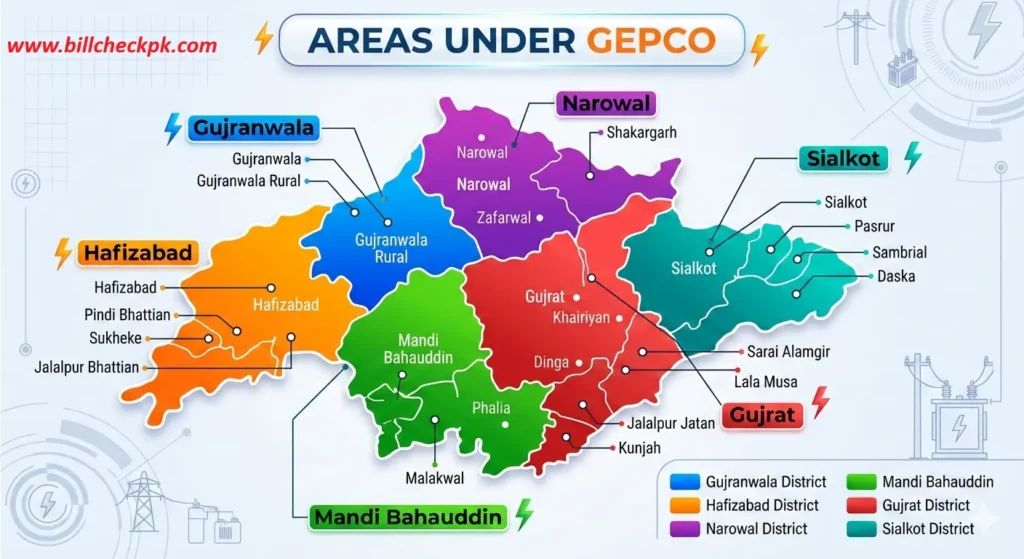
- Gujranwala – The company’s headquarters and largest consumer base.
- Hafizabad – Providing electricity to both rural and urban communities.
- Sialkot – An industrial hub, home to exporters and manufacturers.
- Narowal – Covering domestic and agricultural electricity consumers.
- Gujrat – Known for fan and furniture industries, served by GEPCO.
- Mandi Bahauddin – Supplying power to villages, towns, and commercial users.
GEPCO Customer Service & Helpline
GEPCO offers multiple ways for consumers to get support and register their complaints. You can contact them based on your city or service circle.
Customer Support and Complaints
- Customer Service Helpline: 0800-000-34
- Complaint Center Numbers: 055-9200592, 055-920054, 055-9200592
- Official Website Number: Refer to the GEPCO website for city-specific contacts
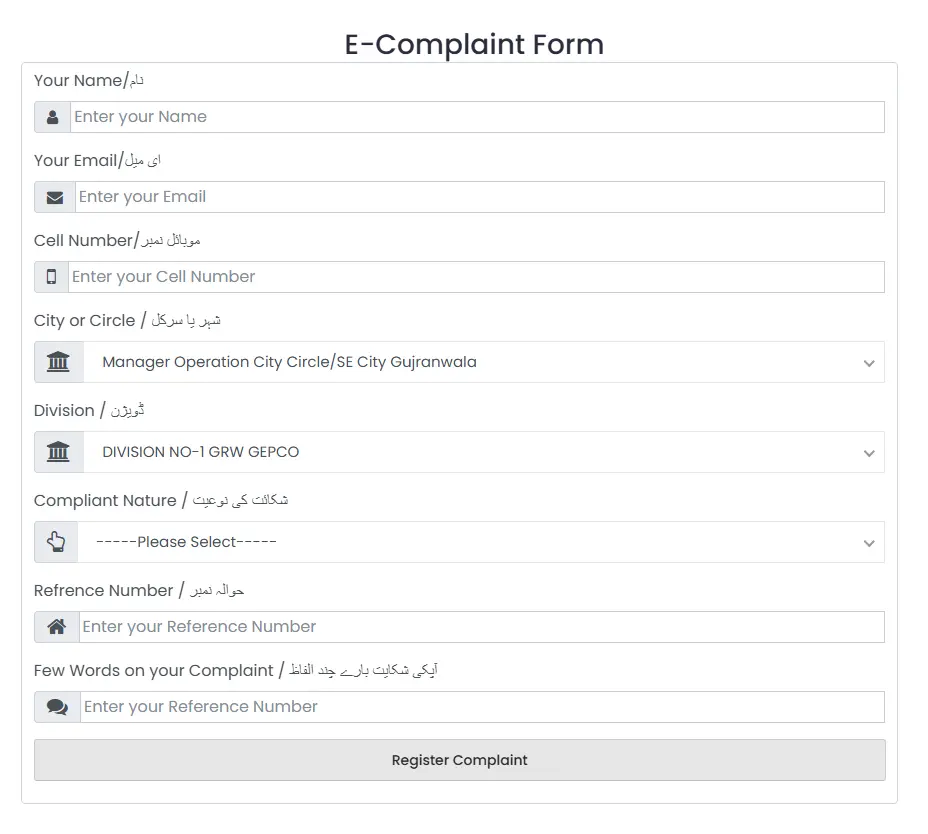
How to Register Complaints
You can submit complaints using the following methods:
- Phone or SMS: Call 118 or send an SMS to 8118
- Email: ccm@pitic.com.pk
- Online: Use the GEPCO CCMS portal for complaint registration and tracking, available 24/7
This ensures your complaint is recorded and can be tracked until resolved.
GEPCO Meter Reading
GEPCO allows consumers to check their meter reading easily. You can receive your meter reading details directly at home via email or SMS , a service also known as e-billing.
How to Subscribe for Meter Reading Service
You can register for e-billing using either SMS or the GEPCO website.
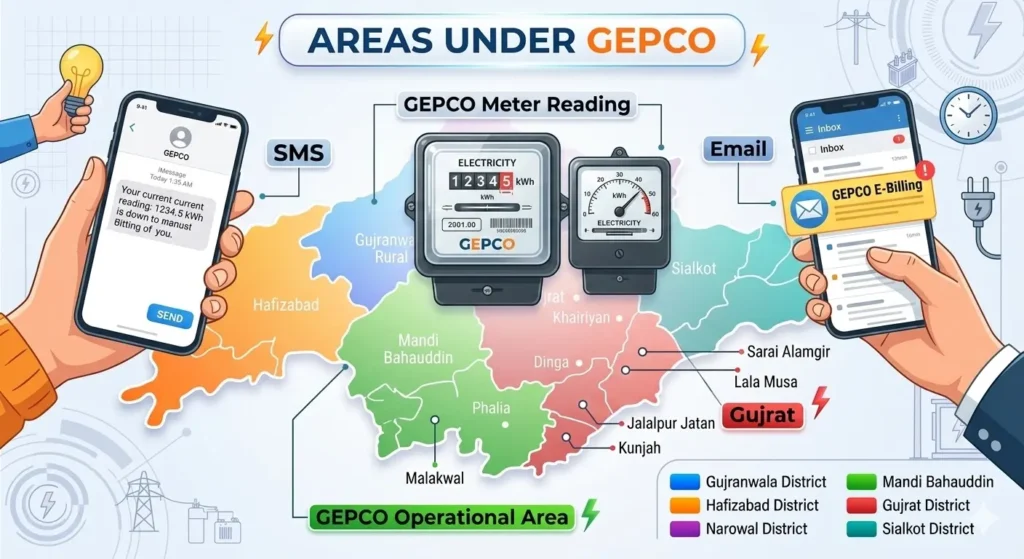
1. Registration via SMS
- Open the messaging app on your mobile.
- Type your reference number without dashes or commas.
- Send it to 8118.
2. Registration via Website
- Visit the official GEPCO website.
- Choose the service: email, SMS, or both.
- Enter your reference number, mobile number, and email address.
Once registered, you will receive your monthly meter reading and bill updates automatically, making it easier to track your electricity usage.
GEPCO Net & Green Metering System
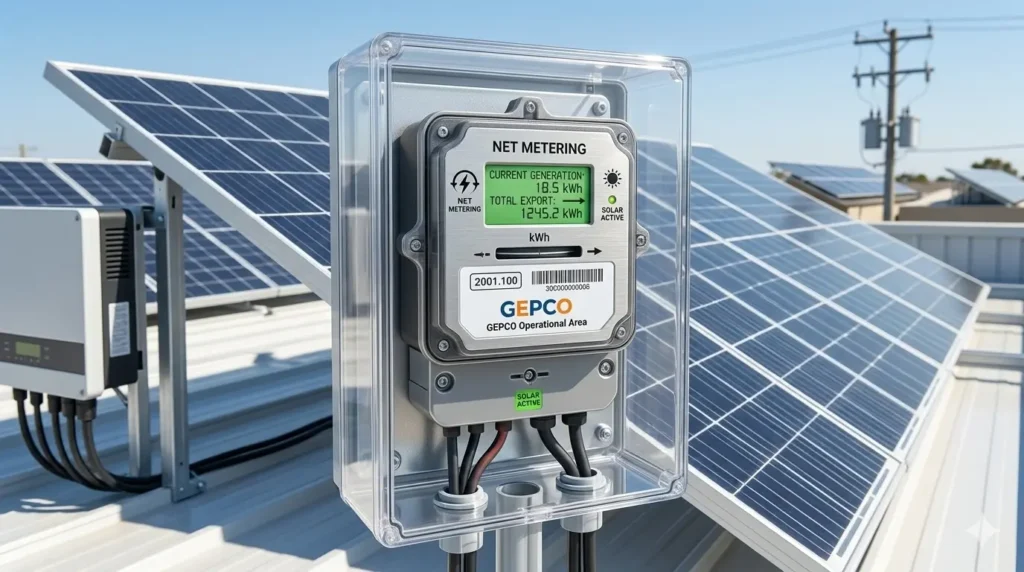
GEPCO Net Metering System
GEPCO provides a Net Metering system that allows consumers to generate their own electricity through solar panels. Any surplus energy produced can be fed back into the grid, reducing electricity bills and enabling consumers to earn from the excess energy generated.
GEPCO Green Metering System
The Green Metering system is designed to enhance billing accuracy and transparency. It minimizes discrepancies by precisely tracking units consumed and applicable taxes, ensuring correct billing, reliable data collection, and greater customer satisfaction.
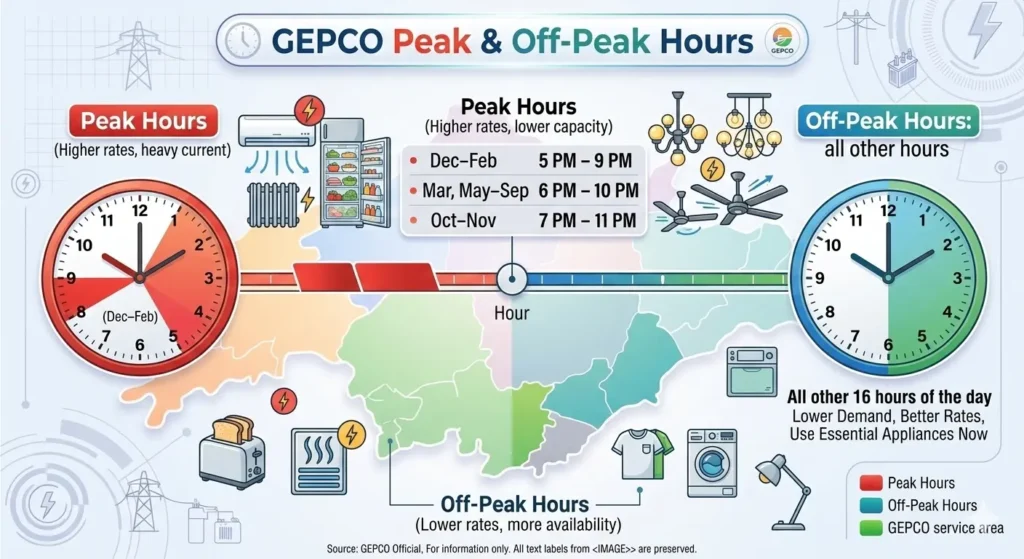
GEPCO Peak and off-Peak Hours.
Peak hours are times of highest electricity demand, usually due to heavy use of appliances like air conditioners and refrigerators. Consumers are advised to reduce usage during these periods.
Peak Timings:
Off-Peak Hours: All other hours when demand is lower.
Tips to Save Electricity During Peak Hours
Taxes on Your GEPCO Bill
GEPCO consumers pay several taxes and charges along with their electricity usage:
- Electricity Duty (1.5%)
- General Sales Tax (17%)
- Income Tax (PKR 50)
- TV License Fee (PKR 35)
- Fuel Price Adjustment
- Neelum Jhelum Surcharg
These taxes help fund various public service and energy projects.
Benefits of Checking Bills Online
Checking your electricity bill online offers several advantages:
- Security
- Convenience
- Automatic payments
- Secure bill payment
- Environment-friendly
- Cost savings
- Customer satisfaction
- Improved efficiency
Electricity Bill Information (GEPCO)
Consumer Information
Includes residential address and consumer number.
- Billing Period
The duration for which the bill is calculated. - Current Charges
Shows the amount of electricity consumed during the billing period. - Due Date
The last date by which the bill must be paid. - Total Charges
The total amount payable, including electricity consumption, FPA, and other applicable taxes. - Other Details
Additional information such as meter reading, billing reference, and payment details.
GEPCO Bill Calculator
With rising electricity costs, managing bills has become a challenge for commercial,domestic, and industrial consumers alike. To stay in control of usage and expenses, a reliable method to calculate your bill online is essential.
GEPCO Bill Calculator 2025
| Description | Amount (Rs.) |
|---|
* Estimated bill. Actual bill may vary due to FPA, arrears and meter reading adjustments.
To address this need, an online GEPCO bill calculator is available. By entering the units you have consumed, the tool provides a detailed breakdown of your electricity bill, helping you understand charges and plan your energy usage more efficiently.
Download or Print Duplicate GEPCO Bill
If you have lost your electricity bill or did not receive it, you can easily download or print a duplicate GEPCO bill online. This helps you check your bill amount and pay it on time.
Steps to Download GEPCO Duplicate Bill
- Enter your 14-digit reference number in the bill search box.
- Click the Check Bill button.
- Your latest GEPCO bill will appear on the screen.
- Click the Download option to save the bill on your device.
Steps to Print GEPCO Bill
- Open your bill after searching with the reference number.
- Click the Print button.
- Select your printer and print the bill copy.
This duplicate bill works the same as the original bill and can be used for bill payment or record keeping.
How to Print Your GEPCO Tax Certificate
GEPCO provides an online facility for customers to download & print their annual tax deduction certificates, which are often required for income tax return filing. This certificate shows the total electricity bill amount and the taxes deducted during the year.
Steps to Print Tax Certificate Online:
- Open your web browser and visit the official Tax Certificate page or use the Tool.
- Enter your 14-digit reference number or customer ID (as printed on your bill).
- Select the tax year you want the certificate for (e.g., 2024–2025,2026).
- Click on the Download / Generate Certificate button.
- Once generated, you can view, save, or print the certificate directly in PDF format.
Notes:
- You can also re-print old certificates for previous years if required.
- The certificate is valid for filing income tax returns with FBR.
- Make sure your reference number is correct to avoid errors.
GEPCO offers multiple bill payment options to make it easy and convenient for customers to clear their monthly electricity bills. Whether you prefer online payment or cash deposit, you can choose the method that best suits you.
GEPCO Domestic & Commercial Users Tariff 2026
The Gujranwala Electric Power Company follows NEPRA-approved electricity tariff rates. These tariff structures are applied according to the type of connection (domestic or commercial) and the number of units consumed.
1. Domestic (Residential) Tariff – A-1 General Supply
| Units Consumed (kWh) | Rate per Unit (PKR) | Example Bill Calculation |
|---|---|---|
| 1 – 50 Units | Rs. 4.00 | 50 × 4.00 = Rs. 200 |
| 51 – 100 Units | Rs. 7.00 | 100 × 7.00 = Rs. 700 |
| 101 – 200 Units | Rs. 10.00 | 200 × 10.00 = Rs. 2,000 |
| 201 – 300 Units | Rs. 37.00 | 300 × 37.00 = Rs. 11,100 |
| 301 – 400 Units | Rs. 43.00 | 400 × 43.00 = Rs. 17,200 |
| 401 – 500 Units | Rs. 47.00 | 500 × 47.00 = Rs. 23,500 |
| Above 500 Units | Rs. 52.00 | 600 × 52.00 = Rs. 31,200 |
Domestic User (300 Units):
- Total Bill (excluding taxes) = Rs. 5,250
- First 50 units × Rs. 4.00 = Rs. 200
- Next 50 units × Rs. 7.00 = Rs. 350
- Next 100 units × Rs. 10.00 = Rs. 1,000
- Next 100 units × Rs. 37.00 = Rs. 3,700
2. Commercial Tariff – C-1, C-2, C-3 Categories
| Connection Type | Load / Units Range | Rate per Unit (PKR) | Notes |
|---|---|---|---|
| C-1 (Small Shops/Offices) | Less than 5 kW load | Rs. 38.82 – 40.26 | Fixed charges apply |
| C-2 (Medium Businesses) | 5 – 500 kW load | Rs. 43.00 – 47.00 | TOU (Peak/Off-Peak) may apply |
| C-3 (Large Industries) | Above 500 kW load | As per Industrial Tariff | Includes demand charges |
Example – Commercial Shop (1,500 Units, C-1):
- 1,500 units × Rs. 38.82 = Rs. 58,230
- Fixed Charges = Rs. 500
- Total Bill (excluding taxes) = Rs. 58,730
Notes:
- Fuel Price Adjustment (FPA), GST, TV Fee, and other surcharges are added separately.
- Time of Use (TOU) connections are charged differently for Peak & Off-Peak hours.
- Subsidized rates apply for lifeline domestic users (up to 50 units).
Quick Links (Other DISCOs at BillCheckPK)
Frequently Asked Questions (FAQ’s)
Find answers to commonly asked questions about GEPCO and it’s online services.
- How to check GEPCO Bill online?
Visit the official GEPCO website, enter your Reference Number or Consumer ID, and view your bill instantly. - How to download my Duplicate GEPCO Bill online?
On the GEPCO portal, select “Duplicate Bill”, enter your Reference Number, and download the PDF copy. - Can I pay my GEPCO Electricity Bill online?
Yes, GEPCO supports online payment via their portal, bank apps, or mobile payment services using your Reference Number. - How to apply for a new connection for GEPCO Electricity meter?
Fill out the new connection application form on the GEPCO website and submit required documents like ID, proof of ownership, and address. - How to contact GEPCO Customer Service Helpline for online complaints?
Call 118 or use the online complaint form on the GEPCO website to report issues or get support. - How to check reading and meter number from GEPCO Electricity Bill?
Your meter number and latest reading are listed on the top section of the bill under consumer details.
Related Searches
- GEPCO duplicate bill
- GEPCO online bill 2026
- WAPDA bill check GEPCO
- GEPCO bill print and download
- Gujranwala electric bill online
Stay updated with your electricity usage — check your GEPCO online bill every month and avoid late payment surcharges.