Check your online LESCO bill in seconds using Billcheckpk. Enter your 14-digit reference number to view your latest bill, due date, payable amount, and billing details. No signup. No delays. Works on mobile and desktop.
Introdection
Lahore Electric Supply Company was formed in 1998 after the corporatization of WAPDA’s distribution division, and today it provides electricity to more than three million residential, commercial, and industrial users across Lahore and nearby districts
LESCO Online Bill Check
Check your LESCO electricity bill instantly on BillCheckPK using your reference number or customer ID. Download or print duplicate bills easily. For daily personal calculations, platforms like themelad.me offer Hijri & Gregorian age calculators, next birthday countdowns, lifestyle stats, and AI-based personality analysis.
🔗 Themelad: https://themelad.me
LESCO Bill Check
Managing your LESCO bill has become easier with online billing services. Consumers can check their current month’s bill, download a duplicate copy, print it for payment, and confirm due dates without visiting any office. This guide explains how to check your bill online and manage billing records efficiently.
How to Check LESCO Bill Online
To view your bill online, follow these steps:
- Open the billcheckpk portal.
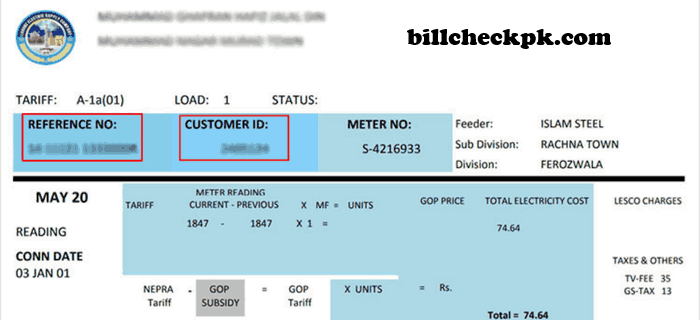
- Enter your 14-digit Reference Number (written on any previous bill).
- Click submit/view.
- Your current bill will appear on the screen.
- You can print or download a duplicate copy if required.
- You do not need a CNIC or phone number. Only the reference number is required.
Information You Need
- A previous bill to get the reference number
- Any mobile device or computer
- Internet connection
Benefits of Checking Your Bill Online
Checking your bill online helps avoid:
- Late payment penalties
- Missing bills
- Delays in receiving the printed copy
It also makes it easy for tenants, shopkeepers, homeowners, and businesses to manage monthly records.
How To Print & Download Your Bill
- Input Bill ID
- Enter 14 digit reference number or 10 digit Customer ID in the designated form
- Submit
- Hit the Submit button, and if there’s any issue with your ID, you’ll instantly get a clear error message letting you know what’s wrong
- Print Bill
- Press Ctrl + P to print your bill or download it as a PDF file
- Bookmark
- Bookmark billcheckpk. for easy access in the future.
Troubleshooting Guide
Invalid Reference Number
Make sure:
- You entered all 14 digits correctly
- There are no spaces
- You are using the latest bill reference
Website Not Loading or Slow
Try refreshing the page, switching browsers, or checking your internet connection.
Why Choose Our LESCO Online Bill Service?
Fastest Bill Check:Optimized servers deliver results instantly, even during peak hours.
Complete Bill Information:See every charge, tax, and adjustment clearly in one place.
100% Secure & Private:No data is saved. No personal information is shared.
Check Shutdown Schedule
Stay informed about planned load shedding and maintenance outages in your area. Checking shutdown schedules helps you plan ahead and avoid inconvenience.
Understanding Your Bill
- Customer Details: Name, address, and connection type
- Billing Period: The usage dates for the current month
- Unit Consumption: The number of kWh used and the applied rate
- Due Date: Last date
Check Shutdown Schedule
Enter your Reference Number to view the shutdown schedule:
Service Areas
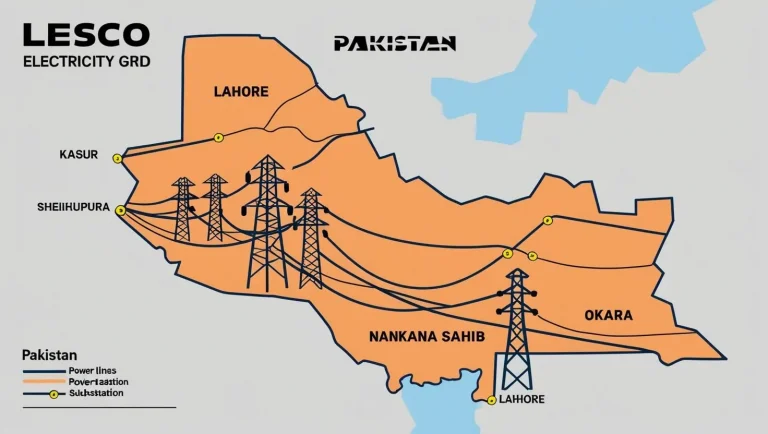
LESCO Provides electricity to:
- Lahore City and Lahore Cantt
- Kasur
- Okara
- Sheikhupura
- Nankana Sahib
Peak / Off-Peak Schedule
| Season | Peak Hours | Off-Peak Hours |
|---|---|---|
| Dec – Feb | 5 PM – 9 PM | All other hours |
| Mar – May | 6 PM – 10 PM | All other hours |
| Jun – Aug | 7 PM – 11 PM | All other hours |
| Sep – Nov | 6 PM – 10 PM | All other hours |
Where You Can Pay Your LESCO Bill
Online payment options:
- Mobile banking apps
- Internet banking
- Easypaisa
- JazzCash
Physical payment locations:
- Post offices
- Banks
- Franchise counters
- Authorized collection shops
Important Offices Contact Numbers
| Office Name | Address | Phone Number |
|---|---|---|
| Chief Executive | 22/A Queens Road, Lahore | 042-99204820-30 (Ext: 100) |
| General Manager Technical | Lahore | 042-99204807 |
| Customer Services Directorate | Lahore | 042-99204814 |
| General Manager Operations | Lahore | 042-99204813 |
| HR & Admin Directorate | Lahore | 042-99204811 |
| Finance Directorate | Lahore | 042-99204816 |
| Legal Directorate | Lahore | 042-36280323 |
LESCO New Connection
Looking to apply for a new electricity connection or update an existing one? This guide explains the process step by step—whether you need to request a fresh meter, change the registered name, adjust load requirements, or modify the tariff category. Existing consumers can also review their monthly bill online or calculate an estimated amount using the available bill calculator tools.
Process of New Connection
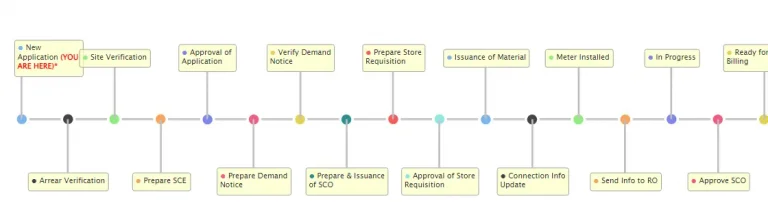
There are two ways to submit a request. You may either visit the nearest customer service office for an in-person application, or apply digitally through the Electricity New Connection (ENC) System. The online portal is generally the better choice, as it allows applicants to upload documents, track progress, and complete the process from home without unnecessary visits.
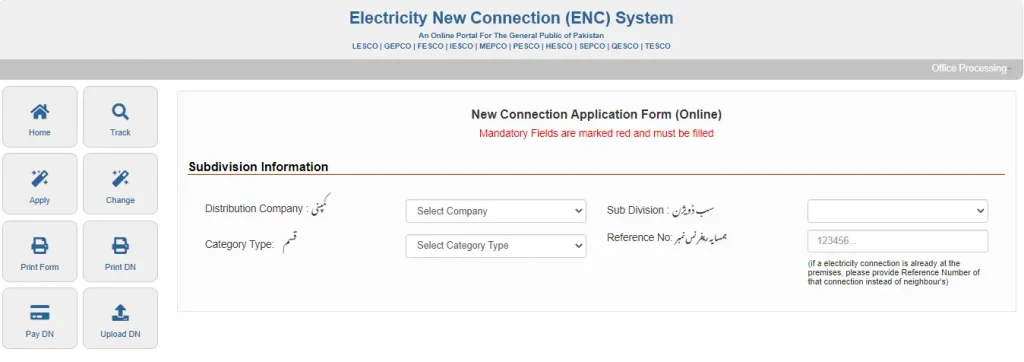
The complete process is described in the following chart.
- Visit the official ENC website.
- Click on the Apply button from the main menu.
- Enter the Bill ID of any of your neighbors and select the desired Load Type for the connection (e.g., 70kW).
- Complete the application form by providing the required information and uploading the following documents (Maximum file size: 300 KB each):
- Copy of property ownership document
- Attested copy of the applicant’s ID card
- Attested copy of the witness’s ID card
- Copy of a neighbor’s electricity bill
- Wiring contractor’s test report
Classifies new electricity connections into three categories based on the required load:
- Category I – Up to 15 kW
- Category II – 16 to 70 kW / 400 Volts
- Category III – 71 to 500 kW / 400 Volts
Note: If the required load exceeds 400 volts, the consumer must arrange and install their own transformer.
Category I – Up to 15 kW
Consumers requiring a load of up to 15 kW should apply under Category I. Applications in this category can be approved by the SDO / Assistant Manager Operations. The entire process typically takes around 30 days to complete
| On submission of the application, the office will issue a receipt. | 1 day |
| Lesco team will check the possibility of the connection. | 3 days |
| The Cost will be estimated. | 2 days |
| The applicant will receive the demand. | 2 days |
| The applicant will submit the paid copy of the demand notice. | 2 days |
| The applicant will submit the test Report. | 3 days |
| The office will prepare a list of applicants according to the dues submission date. | 1 day |
| Orders for service connection will be issued by the office. | 3 days. |
| The office will request the concerned department to provide the necessary equipment to set up the connection. | 3 days |
| The store will provide the required equipment. | 5 days |
| SDO / Assistant Manager will set up the connection after the availability of equipment. | 5 days |
Category II – 16 to 70 kW / 400 Volts
Consumers requiring a load between 16 to 70 kW (at 400 volts) should apply under Category II. This category follows the same application steps as Category I, but the overall process may take up to 73 days due to additional technical evaluations and approvals.
Note:It is important to ensure all required documents are accurate and complete to avoid delays in processing
Category III – 71 to 500 kW / 400 Volts
Customers requiring a load between 71 to 500 kW at 400 volts should apply under Category III. This category also follows the same application process as Category I, but due to the higher load and additional technical requirements, the process can take up to 73 days.
The approval authority for this category is the Manager of Operations.
Note:For loads exceeding 400 volts, the applicant is required to arrange their own transformer as per LESCO regulations
Change of Connection Name, Tariff, or Load
To request a change in connection name, load, or tariff, follow the steps below:
- Visit the official ENC website.
- From the main menu, click on the “Change” option.
- Select the type of change you wish to apply for (e.g., name, load, or tariff).
- Fill in only the relevant fields based on the type of change. For example, if you’re applying for a load change, provide only the details required for that.
- Upload the required documents (maximum file size: 300 KB each):
- Attested copy of the applicant’s CNIC
- Copy of the latest LESCO bill
- Proof of ownership of the property
- Submit your application.
- Upon submission, you will receive a Tracking ID. Be sure to save this for future reference.
Note: The remaining process is similar to the steps outlined for a new connection application.
Track Your Application Status (New Connection or Change Request)
To check the status of your new connection or change of name/tariff/load application, you’ll need your Tracking ID. Follow these steps:
- Visit the official ENC website.
- Click on the “Track” button from the sidebar.
- Select the type of application you submitted (e.g., New Connection or Change of Name/Tariff/Load).
- Choose your company
- Enter your Tracking ID and click Submit.
Once your new connection is active, you can easily check your bill online.
If you have any further questions or issues, feel free to contact the Helpline or contact us.
If you’re looking to calculate your electricity bill based on the latest tariff structure, you’re in the right place. Our Bill Calculator is a simple yet powerful tool that helps you estimate your bill accurately by taking into account the most recent tariff slabs, unit rates, and applicable taxes.
Whether you’re planning your monthly expenses or just want to avoid surprises, this tool makes it easy. Just enter the number of units you’ve consumed, and it will instantly generate an approximate bill amount—covering both energy charges and fixed surcharges. It’s the fastest way to stay informed and in control of your electricity costs.
LESCO Tariff – Bill Rates
The tariff represents the price of a unit on your electricity bill. The price can vary according to the total units consumed in a month. The higher the number of units used, the higher the unit price.Please find below the complete structure of the tariff for all types of consumers
A1 GENERAL TARIFF – DOMESTIC
| CATEGORY | FIXED CHARGES | CHARGES WITH PYA | CHARGES WITHOUT PYA | ||
| For sanctioned load less than 5 kW | |||||
| Up to 50 Units | – | 6.76 | 3.95 | ||
| 51-100 Units | 11.41 | 7.74 | |||
| 001-100 Units | 29.50 | 11.69 | |||
| 101-200 Units | – | 31.86 | 14.16 | ||
| 001 – 100 Units | – | 30.64 | 23.59 | ||
| 101-200 Units | – | 33.76 | 30.07 | ||
| 201-300 Units | – | 36.89 | 34.26 | ||
| 301-400 Units | 200 | 39.93 | 39.15 | ||
| 401-500 Units | 400 | 41.15 | 41.36 | ||
| 501-600 Units | 600 | 42.40 | 42.78 | ||
| 601-700 Units | 800 | 43.79 | 43.92 | ||
| Above 700 Units | 1000 | 48.84 | 48.84 | ||
| For Sanctioned load 5 kW& above | |||||
| Peak | Off-Peak | Peak | Off-Peak | ||
| Time of Use | 1000 | 44.44 | 38.15 | 48.00 | 41.68 |
| Pre-Paid Residential Tariff | 1000 | 49.98 | 49.98 | ||
The minimum monthly bill when no energy is consumed is as follows.
- Single Phase Connections: Rs. 75/- per consumer per month
- Three Phase Connections: Rs. 150/- per consumer per month
A-2 General Supply Tariff – Commercial
| Tariff Category | Fixed Charges | Charges with PYA | Charges October 2024 Onward | |||
| For sanctioned load less than 5 kW | 37.99 | 38.59 | ||||
| For sanctioned load 5 kW & above | 1250 | 40.91 | 40.91 | |||
| Peak | Off-Peak | Peak | Off-Peak | |||
| Time of use | 1250 | 45.32 | 34.52 | 44.97 | 36.30 | |
| Electric Vehicle Charging Station | 42.99 | 45.55 | ||||
| Pre-Paid Residential Tariff | 1250 | 45.01 | 47.10 | |||
The minimum monthly bill for A2 when no energy is consumed is as follows.
- Single Phase Connections: Rs. 175/- per consumer per month
- Three Phase Connections: Rs. 350/- per consumer per month
A – 3 General Services
| Tariff Category | Fixed Charges | Charges with PYA | Variable Charges October 2024 onward | |
| General Services | 1000 | 43.97 | 43.64 | |
| Pre-Paid General Services | 1000 | 51.12 | 51.30 | |
The minimum monthly bill for A3 when no energy is consumed is as follows.
- Three Phase Connections: Rs. 175/- per consumer per month
- Single Phase Connections: Rs. 175/- per consumer per month
B – Industrial Supply Tariff
| Tariff Category | Fixed Charges | Charges with PYA | Charges without PYA | |||
| B1(a) | 29.38 | 31.95 | ||||
| B2(a) | 1250 | 28.80 | 31.88 | |||
| B1(b) | Peak | Off-Peak | Peak | Off-Peak | ||
| B2(b) | 35.29 | 28.64 | 37.89 | 31.20 | ||
| B3 | 1250 | 37.34 | 26.64 | 37.83 | 28.56 | |
| B4 | 1250 | 34.86 | 25.57 | 37.83 | 29.39 | |
| For all loads ( 66,132 kV and above) | 1250 | 35.95 | 26.06 | 37.83 | 29.11 | |
| Pre-Paid Industrial supply Tariff | 1250 | 42.17 | 44.46 | |||
For this load, only fixed charges will be charged but no minimum monthly charges will be charged
C – Single Point Supply
| TARIFF CATEGORY | Fixed Charges | Charges with PYA | Variable Charges October 2024 onward | |||
| C1(a) | 25.20 | 25.25 | ||||
| C1(b) | 500 | 25.00 | 25.05 | |||
| C2(a) | 460 | 41.78 | 41.78 | |||
| C3(a) | 440 | 40.40 | 41.72 | |||
| C1(c) | 1250 | 39.96 | 41.92 | |||
| Time of Use | Peak | Off-Peak | Peak | Off-Peak | ||
| For supply at 400/230 Volts (5kW to 500 kW) | 1250 | 48.16 | 38.57 | 47.47 | 38.70 | |
| For supply over 5000 kW (at 11/33 kV) | 1250 | 47.80 | 36.36 | 47.47 | 37.18 | |
| For supply Over 5000 kW (at 66 kV and above) | 1250 | 42.86 | 31.09 | 47.47 | 36.91 | |
| Pre-Paid Bulk Supply Tariff | 1250 | 53.45 | 54.85 | |||
The fixed charges for each month are calculated based on 50% of the sanctioned load or the actual MDI for that month, whichever is greater
D – Agricultural Tariff
| TARIFF CATEGORY | Fixed Charges | Charges with PYA | Variable Charges October 2024 onward | |||
| D-1(a) | 41.02 | 41.02 | ||||
| D-2(a | 400 | 36.61 | 30.05 | |||
| Time of Use | Peak | Off-Peak | Peak | Off-Peak | ||
| D1(b) | 400 | 44.06 | 35.84 | 43.94 | 35.86 | |
| D-2(b | 400 | 30.72 | 29.63 | 30.69 | 29.85 | |
| 400 | 33.73 | 37.36 | ||||
Under this load, Rs 2000/-per consumer will be charged If no energy is consumed.
E – TEMPORARY SUPPLY TARIFF
| TARIFF CATEGORY | FIXED CHARGES | Charges with PYA | Variable Charges October 2024 onward |
| E-1(i) | 54.73 | 59.09 | |
| E-1(ii) | 41.36 | 54.60 | |
| E-2 | 32.81 | 43.40 |
F – SEASONAL INDUSTRIAL SUPPLY TARIFF
| Tariff-F consumers can switch to Regular tariff and vice versa. You can opt this option at the time of a new connection or at the start of the season. |
G – PUBLIC LIGHTING
| TARIFF CATEGORY | `Fixed Charges | Charges with PYA | Variable Charges October 2024 onward |
| Street Lighting | 2000 | 44.06 | 44.06 |
A base monthly fee of Rs. 2000 will be imposed according to the G-Public Lighting Tariff.
H – RESIDENTIAL COLONIES
| TARIFF CATEGORY | Fixed Charges | Charges with PYA | Variable Charges October 2024 onward |
| Residential Colonies attached to industrial premises | 2000 | 43.25 | 43.25 |
A base monthly fee of Rs. 2000 will be imposed according to the H-Residential Colonies Tariff.
FAQs
No. The official LESCO system only supports Reference Number (14 digits) or Consumer ID. CNIC or name search is not available.
Yes. The bill you download online is valid for payment at banks, mobile apps, Easypaisa, JazzCash, and other authorized agents. You can print the PDF or pay directly through mobile banking.
If you miss the due date, a late payment surcharge will be added. Continuous delay may also result in disconnection, so always try to pay on time.
You can register a complaint by dialing 118, calling 042-111-000-118, or sending an SMS to 8118. LESCO will arrange meter re-checking if required.
Your Reference Number is a 14-digit code printed on the top left of your physical bill. If you don’t have the bill, contact LESCO’s helpline for assistance.
After entering your Reference Number on the online portal, you can view the bill. Use the Download PDF option or press Ctrl+P to print a copy.
LESCO peak hours change seasonally:
- Dec – Feb: 5 PM – 9 PM
- Mar – May: 6 PM – 10 PM
- Jun – Aug: 7 PM – 11 PM
- Sep – Nov: 6 PM – 10 PM
Quick Links Other DISCOs
The same simple process can be used to check bills for other major electricity and gas companies in Pakistan:
Contact Us
Consumers can easily access all important services at billcheckpk.com. We provide helpful tools such as online bill check, bill calculator, bill payment methods, payment status tracking, and guidance for new connections.
If you still have any queries, suggestions, or feedback, we’d love to hear from you.
You can reach us by email at support@billcheckpk.com or fill out the contact form below. For official assistance, you may also contact the helpline directly.