Check the TESCO electricity bill online at Billcheckpk. View, download, or print a duplicate bill instantly.
Table of Contents
Table of Contents
About TESCO (Tribal Electric Supply Company)
TESCO is responsible for providing electricity to the Tribal Areas (FATA) and adjoining regions of Khyber Pakhtunkhwa. The company operates under PEPCO and serves both domestic and commercial consumers.TESCO’s aim is to ensure reliable power distribution, efficient billing, and transparent tariff updates for all its customers.
TESCO Bill Check – Enter Reference Number
Easily check your TESCO electricity bill online by entering your 14-digit reference number in the form below. You can instantly view, download, or print your duplicate TESCO bill for free.
How to Check TESCO Online Bill
Follow these simple steps to check your TESCO bill online at Billcheckpk:
- Go to the official Billcheckpk TESCO Bill Page.
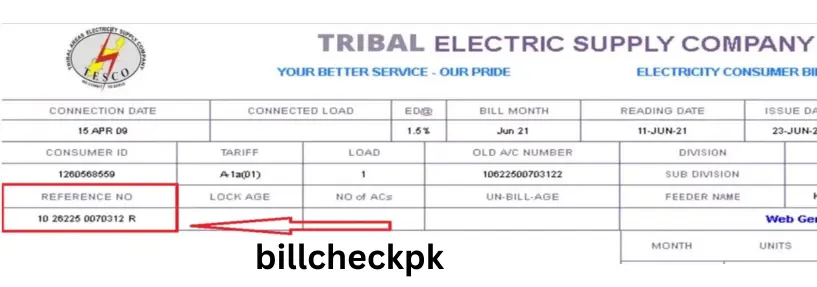
- Enter your 14-digit reference number found on any old electricity bill.
- Click on “Check Bill”.
- View your latest TESCO duplicate bill with due date, amount, and units consumed.
- Download or print your bill for record or payment.
Why Use Billcheckpk for TESCO Bill?
- 100% free and secure bill checking
- Access from mobile or desktop anytime
- Instant duplicate bill download
- Updated NEPRA tariff 2026
- No registration or login required
- Quick bill calculator & payment guide
TESCO Bill Calculator 2026
You can easily estimate your upcoming bill using the TESCO bill calculator at Billcheckpk.
| Units Used | Rate (PKR/unit) | Total Amount (PKR) |
|---|---|---|
| 100 Units | 5.79 | 579 |
| 200 Units | 8.11 | 1,622 |
| 300 Units | 10.20 | 3,060 |
Areas Covered by TESCO
- Khyber District
- Bajaur
- Mohmand
- Kurram
- Orakzai
- North Waziristan
- South Waziristan
- Frontier Regions adjoining KP
Peak & Off-Peak Hours (Time-of-Use Tariff)
| Period | Time | Rate Type |
|---|---|---|
| Peak Hours | 6:00 PM – 10:00 PM | High Rate |
| Off-Peak Hours | 10:00 PM – 6:00 PM | Low Rate |
(Applicable for 3-phase TOU consumers only)
TESCO Bill Payment Methods
Online Payment Options
- JazzCash
- Easypaisa
- NayaPay
- HBL Konnect
- UBL Digital App
- Allied Bank Internet Banking
- Meezan Bank App
Offline Payment
You can pay your TESCO bill at:
- All major banks
- Pakistan Post Office
- NADRA e-Sahulat centers
How to Download TESCO Tax Certificate
If you need your annual income tax certificate for record or tax filing:
- Visit TESCO Tax Certificate Portal.
- Enter your reference number and CNIC.
- Select billing year (e.g., 2024–2025,2026).
- Download your tax certificate in PDF.
New TESCO Connection (Domestic / Commercial)
Steps to apply for a new electricity connection:
- Visit your nearest TESCO Sub-Division Office or apply online at ENC Portal.
- Fill out the Application Form (A-1).
- Attach CNIC copy, property ownership proof, and wiring test report.
- Submit the application and receive a tracking number.
- Pay the security deposit and meter installation fee.
- Connection is usually installed within 30–45 days after approval.
TESCO Complaint Numbers
| Department | Contact |
|---|---|
| TESCO Helpline | 111-000-118 |
| Fault Complaint | 0945-920336 |
| Billing Inquiry | 0945-920211 |
| Customer Service Email | complaint@tesco.gov.pk |
Quick Links (Other DISCOs at BillCheckPK)
- LESCO Bill Online Check
- FESCO Bill Online Check
- GEPCO Bill Online Check
- IESCO Bill Online Check
- MEPCO Bill Online Check
- HESCO Bill Online Check
- HAZECO Bill Online Check
- PESCO Bill Online Check
- SEPCO Bill Online Check
- QESCO Bill Online Check
- GAS Bill Online Check
- PTCL Bill Online Check
Frequently Asked Questions (FAQ)
Q1: How can I check my TESCO bill online?
A: Visit Billcheckpk, enter your 14-digit reference number, and click “Check Bill” to view your latest bill.
Q2: Can I download or print my TESCO bill?
A: Yes, after viewing your bill, you can download or print the duplicate copy.
Q3: What if my bill is not showing?
A: Recheck your reference number or wait for 24 hours — sometimes new bills take time to update.
Q4: Does TESCO offer online payment?
A: Yes, through JazzCash, Easypaisa, NayaPay, and all major bank apps.
Q5: How can I apply for a new TESCO connection?
A: Visit your nearest TESCO office or apply via the ENC Portal online.
Q6: What are peak and off-peak hours?
A: Peak hours: 6:00 PM – 10:00 PM (higher rate); Off-peak: rest of the day (lower rate).
Q7: How to calculate my estimated bill?
A: Use the Billcheckpk calculator by entering the number of units consumed.
Q8: How to download TESCO tax certificate?
A: Go to the TESCO tax certificate page, enter your reference number, and download the PDF.
Q9: Which areas come under TESCO?
A: Tribal Areas including Khyber, Kurram, Orakzai, Waziristan, Bajaur, and Mohmand.
Q10: Where can I contact for billing complaints?
A: Call 111-000-118 or email complaint@tesco.gov.pk.