
Want to know your upcoming lesco electricity bill in advance? We provide a free online lesco bill Calculator to estimate your expected amount. Simply enter units to get an approximate bill.
LESCO Bill Calculator
* Based on LESCO 2025 official tariff rates approved by NEPRA.
| Description | Amount (Rs.) |
|---|
Now You can estimate your lesco electricity bill using the Bill Calculator. Please note that this is only a rough estimate, and the actual amount may vary slightly due to quarterly tariff adjustments by NEPRA, known as Fuel Price Adjustment (FPA). Enter your units and press the calculate button to get your estimated bill.
How to Use the Bill Calculator
You can easily calculate your estimated bill once you know the number of units consumed. Simply enter your consumed units in the given field, and the lesco bill calculator will display your estimated bill amount.
This is only an estimate bill amount. The actual bill may vary due to Fuel Price Adjustment (FPA), quarterly tariff adjustments, and other taxes.

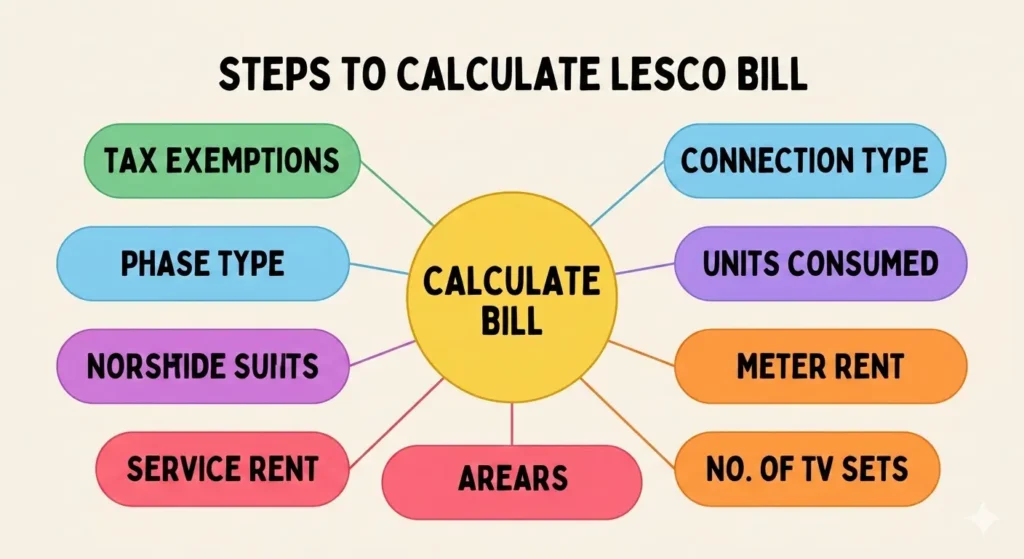
Before calculating your lesco bill you should know some technical terms used in the process. Here we will discuss them in detail for your convenience.
How Bill Calculator Works
Here we will discuss the steps involved in working and the requirements of the Lesco Bill Calculator. We have to follow the following steps to calculate our bill:

Connection Type
Before calculating your lesco bill, you must first identify your connection type. Different categories apply to different consumers based on usage and tariff classification. Below are the commonly used connection types:
- A1 (01) – Domestic
- A1 (03) – Domestic
- A2 (04) – Commercial
- A2c (06) T – Commercial
- B1 (07) – Industrial
- B1 (08) – Industrial
- B1b (09) T – Industrial
- B2a (10) – Industrial
- B2a (11) – Industrial
- B2b (12) T – Industrial
- A3 (66)
Select the connection category that matches your electricity meter to ensure accurate bill estimation.
Phase Type
LESCO provides electricity connections in two phase categories:
Single Phase
Single-phase connections are generally provided to residential consumers. They operate at a voltage range of 220–240 volts and use two wires: one active (phase) wire and one neutral wire.
Three Phase
Three-phase connections are designed for higher electricity demand, typically for commercial and industrial use. These systems operate at 410–440 volts and are connected through three active wires along with one neutral wire.
Units Consumed
To calculate your electricity bill, enter the total units consumed during the relevant month. This is calculated as the difference between the previous month’s meter reading and the current reading.
You can enter consumption in any of the following formats:
- Kilowatt Hour (kWh)
- Kilovolt Ampere Reactive Hour (kVARh)
- Maximum Demand Indicator (MDI)
There are usually two separate unit fields:
- Off-Peak Units
- Peak Units
Make sure to enter both peak and off-peak consumption accurately for a more precise estimate.
Now you can apply online for a new connection easily. Just visit our page New Connection for all the information and the required documents.
Meter Rent
Enter the meter rent here if it applies to your tariff. This amount will be added to your monthly bill.
Service Rent
Provide the service rent for your connection in this field if your plan includes it.
Arrears
If you have any outstanding dues, enter the amount here. It will be included in this month’s bill.
Number of TV Sets
Specify the number of functional TV sets connected to your account. The PTV fee is calculated based on this number.
Tax Exemptions
Select or deselect the following options as applicable:
- STRN Available
- Sales Tax for Retailers Exempt
- ED Exempt
- GST Exempt
- IT Exempt
- E-Tax Exempt
- Additional Sales Tax for Marble and Granite Industry
Note: These exemptions are primarily relevant for commercial and industrial consumers.
Bill Calculation
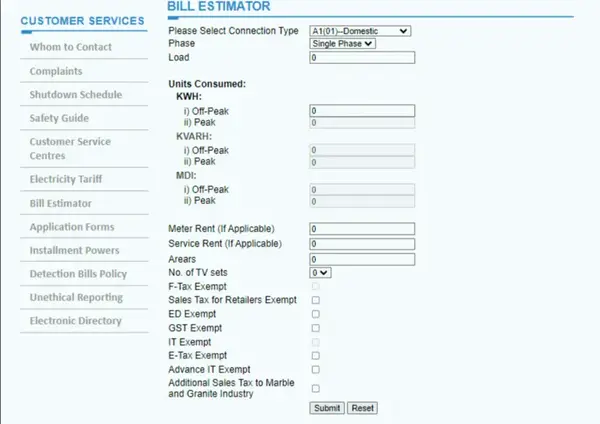
To calculate your bill, enter all the required details mentioned above and click Submit. The system will then estimate your current bill amount.
The calculation is based on the Unit Rate 2026.
You can also receive an SMS alert for your current month’s electricity consumption. To register for this service, visit SMS Registration.
Conclusion
To estimate your bill, simply enter the number of units consumed. Our Bill Calculator will display the approximate amount due. Please note that the estimated bill includes various taxes, so there may be a slight difference compared to your final bill.
WAPDA taxes can change due to government decisions, surcharges, or new policies. For the most accurate and up-to-date information, always refer to your official online bill or paper bill after using this tool.
If you are not satisfied with the services, you can easily submit a complaint through the Complaint Management System.
FAQs – Frequently Asked Questions
1. How do I calculate my electricity bill?
To calculate your bill, enter the number of units consumed along with any applicable charges like meter rent, service rent, arrears, and taxes in the Bill Calculator. Click Submit, and it will provide an estimated bill amount based on the current unit rates.
2. Will I get the exact amount of my bill using the calculator?
No, the calculator provides an estimate. The final bill may vary slightly due to additional taxes, surcharges, or government adjustments. Always check your official online or paper bill for the exact amount.
3. How do I check my Navigate Bill?
To check your Navigate Bill, visit the official electricity provider’s website or your account portal, enter your consumer reference number or connection details, and you can view your current and past bills online.
4. How do I find out my Lahore electricity bill?
For Lahore, you can check your electricity bill online via the LESCO eBill portal. Enter your reference number, and the system will display your current bill along with previous bills and payment history.
5. How do I download my e-bill?
After checking your bill online, look for the Download or Print option on the portal. This allows you to save a PDF copy of your e-bill for records or payment purposes